

Multilingual Chatbots: What it is, How to Build?
In this comprehensive guide, I’ll walk you through everything you need to know about multilingual chatbots and show you exactly how to build one using Salesgroup’s intuitive platform.
Whether you’re a small business taking your first steps into international markets or an established enterprise looking to streamline global communications, this guide will help you create an effective multilingual chatbot strategy that delights customers worldwide.
What Are Multilingual Chatbots?
Multilingual chatbots are AI-powered conversational interfaces designed to interact with users in multiple languages. Unlike standard chatbots that operate in a single language, multilingual chatbots can detect, process, and respond in various languages, allowing businesses to serve diverse customer bases without language barriers.
These sophisticated tools combine natural language processing (NLP), machine translation, and language detection algorithms to provide seamless communication experiences regardless of the user’s preferred language.
Key Benefits of Multilingual Chatbots
Before diving into the technical aspects, let’s explore why implementing a multilingual chatbot can be transformative for your business:
- Global Market Reach: Communicate with customers worldwide without language limitations.
- Enhanced Customer Experience: Provide support in your customers’ native languages, increasing satisfaction and engagement.
- Cost Efficiency: Reduce the need for multilingual human agents for routine queries.
- Consistent Brand Voice: Maintain your brand’s tone and messaging across all languages.
- Scalability: Easily add new languages as your business expands to new markets.
How Do Chatbots Detect and Manage Different Languages?
One of the most fascinating aspects of multilingual chatbots is their ability to identify which language to use with each user. Here are the primary methods chatbots employ for language detection and selection:
1. Automatic Language Detection
Modern NLP systems can automatically identify the language of incoming text by analyzing patterns, character sets, and linguistic features. This happens in real-time when a user sends their first message, allowing the chatbot to immediately switch to the appropriate language.
These detection algorithms typically:
- Analyze character frequency distributions
- Identify language-specific words and phrases
- Recognize unique alphabets and special characters
- Apply statistical models trained on multilingual datasets
2. User Preference Settings
Many chatbot platforms allow users to explicitly select their preferred language through:
- Language selection dropdowns or buttons
- Browser settings integration
- Account preferences
- Geographic IP detection
3. Context-Based Language Switching
Advanced chatbots can switch languages mid-conversation based on:
- Explicit language change requests
- Detection of language switching in user messages
- Regional context clues in the conversation
4. Geolocation-Based Defaults
Chatbots can default to specific languages based on:
- IP address location
- Website domain locale (.fr, .de, etc.)
- Mobile device location settings
Building a Multilingual Chatbot with Salesgroup: Step-by-Step Guide
Salesgroup offers a powerful platform for creating and deploying multilingual chatbots with minimal technical knowledge required. Here’s how to set up your own multilingual chatbot:
Step 1: Sign Up and Access Your Dashboard
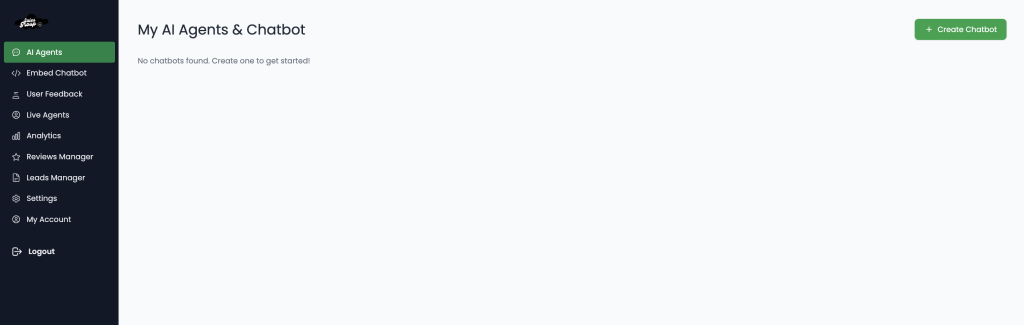
After you have signed up as a user on Salesgroup, navigate to the “AI Agents” settings on your AI dashboard. This will be your central hub for configuring and managing your chatbot.
Step 2: Enable Chatbot Functionality
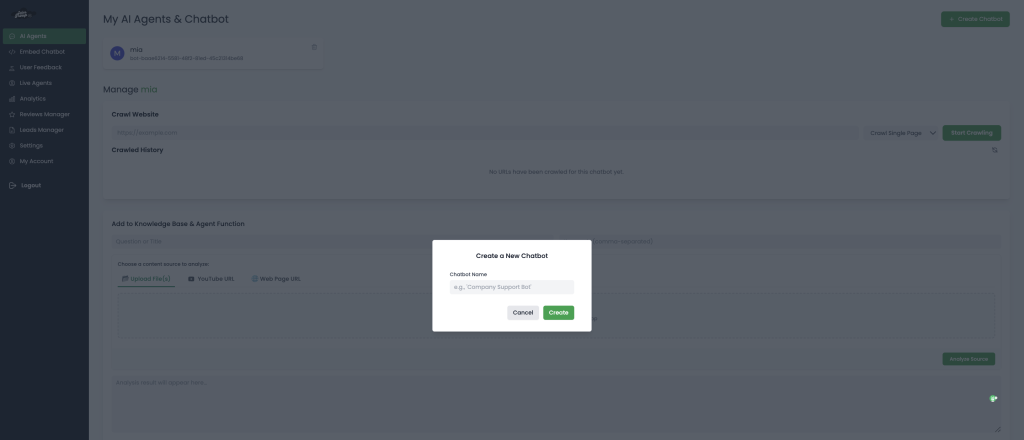
The AI Agent features allows you to create a chatbot from scratch and within that same dashboard, you are able to tweak your chatbot personality (brand identity, knowledge base, etc). This activates the basic chatbot functionality that we’ll expand with multilingual capabilities.
Step 3: Configure Website Information Sources
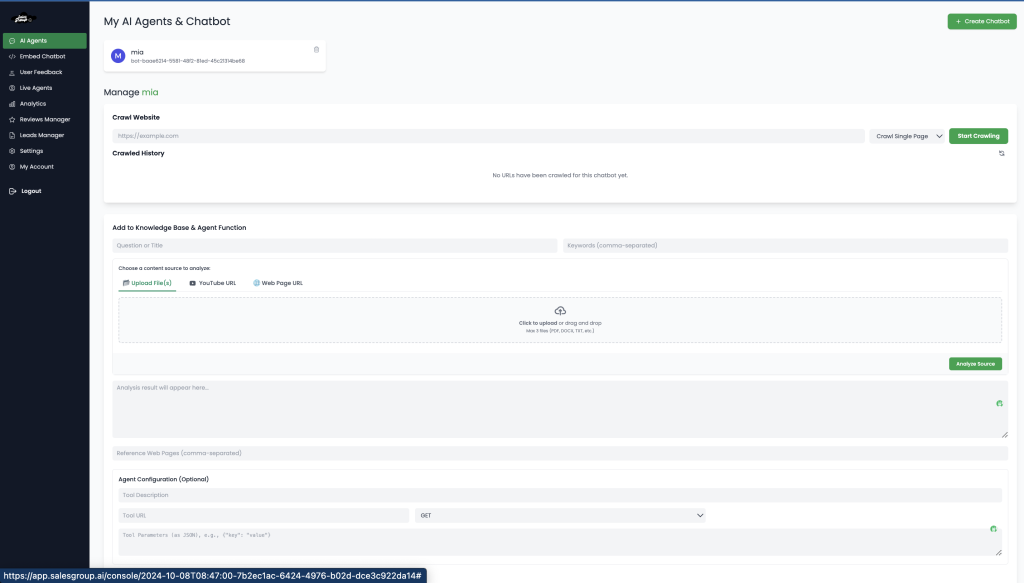
In the setup interface, you’ll need to provide several information sources:
Crawl Website Section:
- Website URL: Enter the website where you want to add the chatbot
- Crawl type: Select crawling method (currently shows “Crawl Single Page” option)
Knowledge Base Section:
This is for creating a self-service portal with frequently asked questions:
Content Input:
- Question or Title: Enter common questions users ask frequently
- Content Source (choose one method to provide answers):
- Upload File(s): Upload FAQ documents, guides, or manuals (doc, docx, txt, pdf up to 512.4MB)
- YouTube URL: Link to instructional videos that answer common questions
- Web Page URL: Link to existing FAQ pages or help documentation
- Reference Sources: Add comma-separated URLs to additional help pages or documentation
Agent Function Section (Optional):
This is where you configure the live agent integration:
- Tool Description: Describe what the live agent tool does or when it should be triggered
- Tool URL: API endpoint or URL for connecting to your live agent system
- Image Upload: Upload images related to the live agent feature (logos, avatars, etc.) – supports img, jpg, jpeg, gif up to 4MB
Step 4: Configure Multilingual Support
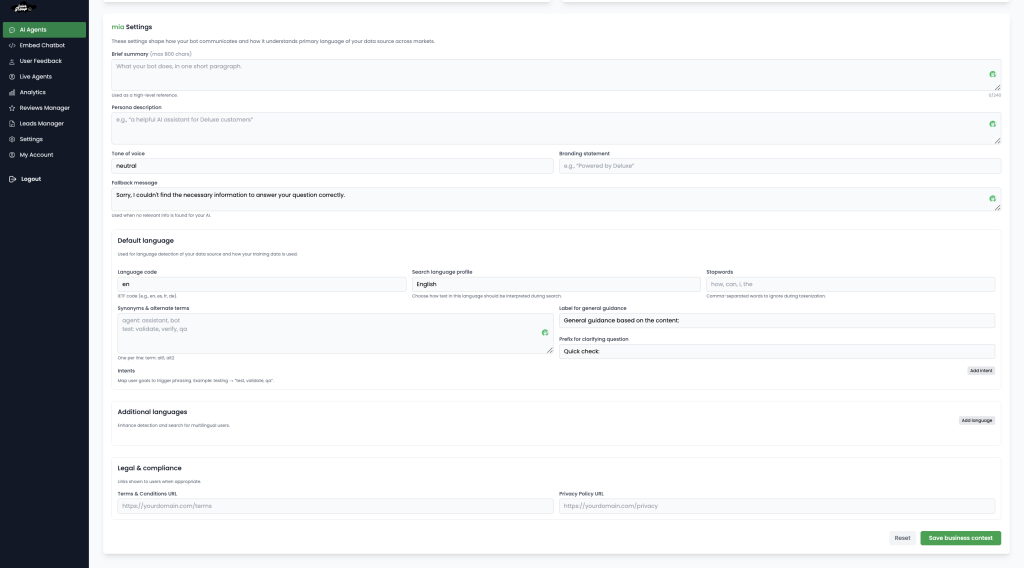
Scroll down to the default language area within the AI agent feature, you would find the ‘default language screen’, the primary default language for your AI Chatbot is english, To add muloggle on the “Multilingual” option to enable language support on your chatbot. This setting opens additional configuration options specific to language handling.
Step 5: Select Chatbot Type
Choose the appropriate chatbot type based on your business needs:
- Sales Chatbot: Focused on converting visitors into customers
- Marketing Chatbot: Designed to engage visitors and generate leads
- Support Chatbot: Built to answer questions and resolve customer issues
Each type comes with pre-configured templates optimized for different business objectives.
Step 6: Customize Your Chatbot Appearance
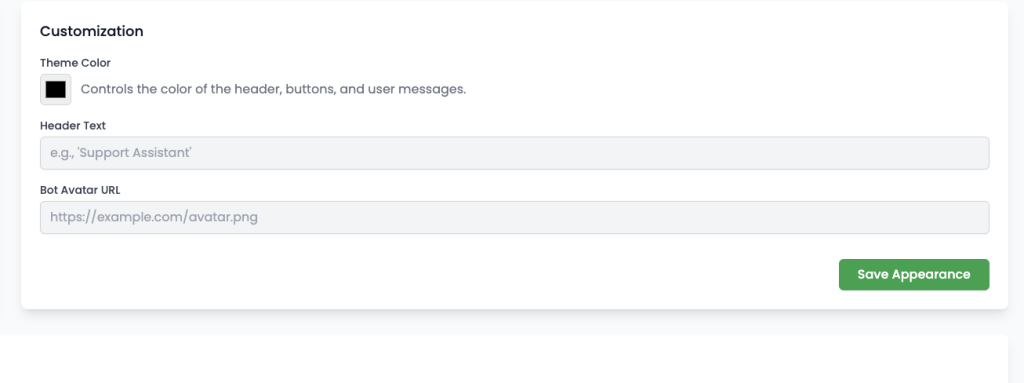
Navigate to the “Customization” section to personalize how your chatbot looks and feels:
Chatbot Theme Color: Choose a color scheme that matches your brand:
- Use the color picker or enter a specific hex code (e.g.,
#000000) - Select from various shade options for your primary color
- Preview how the color scheme will look in real-time
Once you’ve completed the customization process, you’ll be ready to generate and implement the code for your website.
Step 7: Add code to Your website
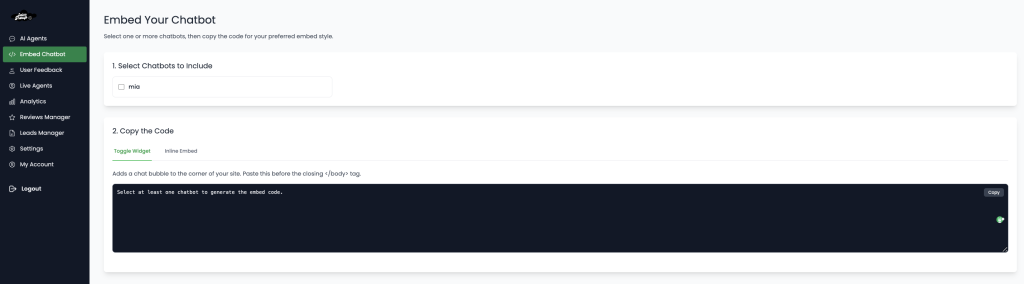
Once you’ve finished configuring your chatbot, you need to add it to your website. To do this, navigate to Embed Chatbot, select the chatbot you want to display on your site, copy the embed code, and paste it into the body section of your website’s HTML.
Step 7: Test Your Chatbot Thoroughly
Before deploying your multilingual chatbot, test it rigorously:
- Conduct conversations in each supported language
- Test language switching mid-conversation
- Verify cultural nuances are appropriately handled
- Check for translation accuracy and contextual understanding
Step 8: Deploy and Monitor Performance
Once testing is complete:
- Deploy your chatbot across your digital properties
- Set up analytics to track performance by language
- Monitor key metrics like resolution rate, customer satisfaction, and engagement across different languages
- Regularly review transcripts to identify improvement opportunities
Related: Chatbot Marketing: Benefits and Tips
Best Practices for Multilingual Chatbots
To ensure your multilingual chatbot delivers exceptional customer experiences:
1. Respect Cultural Differences
Beyond language translation, consider cultural contexts, idioms, and communication styles.
2. Maintain Consistent Brand Voice
Ensure your brand personality translates appropriately across all languages.
3. Use Native Speakers for Training
Have native speakers review and refine your chatbot’s responses to ensure natural communication.
4. Update Language Models Regularly
Language evolves constantly; keep your chatbot updated with new terms and expressions.
5. Provide Clear Language Options
Make it easy for users to switch languages if the automatic detection is incorrect.
Common Challenges and Solutions
Building effective multilingual chatbots comes with unique challenges:
Challenge 1: Translation Accuracy
Solution: Combine machine translation with human-verified responses for critical interactions.
Challenge 2: Dialect and Regional Variations
Solution: Train your chatbot to recognize regional dialects and variations within languages.
Challenge 3: Complex Language Structures
Solution: Implement sophisticated NLP models that understand complex grammar and syntax across languages.
Challenge 4: Cultural Nuances
Solution: Include cultural context in your training data and responses.
Conclusion
Multilingual chatbots are no longer a luxury but a necessity for businesses with global ambitions. With Salesgroup’s intuitive platform, you can build, deploy, and optimize a multilingual chatbot that breaks down language barriers and connects with customers worldwide.
By following the steps outlined in this guide, you’ll be well on your way to creating personalized, culturally-appropriate conversational experiences that resonate with users regardless of their preferred language.
Ready to transform your customer interactions across languages and cultures? Start building your multilingual chatbot with Salesgroup today!
