

Helpdesk Software Review: Features, Pricing, Pros & Cons 2026
Let’s do a helpdesk software review because in this new era, the modern business is defined by one thing: customer experience. That’s the most important thing! In the world we are today, giving great support isn’t just nice; it’s absolutely necessary. Great support is what makes customers stick around. A powerful tool called Helpdesk software helps you deliver this great service.
In this article, we are going to dive deep into the world of customer support, exploring everything about these important systems. We’ll break down what they are, look at the main features that help your team work faster, explain how much they cost, and wrap up with a look at the different kinds of tools available to growing businesses.
We want to give you a clear, easy-to-understand look at how helpdesk software turns messy customer problems into smooth, productive, and truly great experiences for everyone. Let,s dive in
What is Helpdesk Software?
At its core, helpdesk software is a smart, central system made to handle all the support talks between a company and its customers (or its own employees). Think of it as the ultimate control room for your support team. It’s the digital place where every customer request, no matter where it comes from, is captured, tracked, organized, and finally solved.
The history of customer support is often a messy one: scattered phone notes, disorganized email folders, and long internal email chains. Helpdesk software was invented to fix this mess. It takes communication from every channel—like email, phone calls, live chat, social media messages, and forms—and gathers it into one neat, easy-to-manage platform.
How Helpdesk Software Works
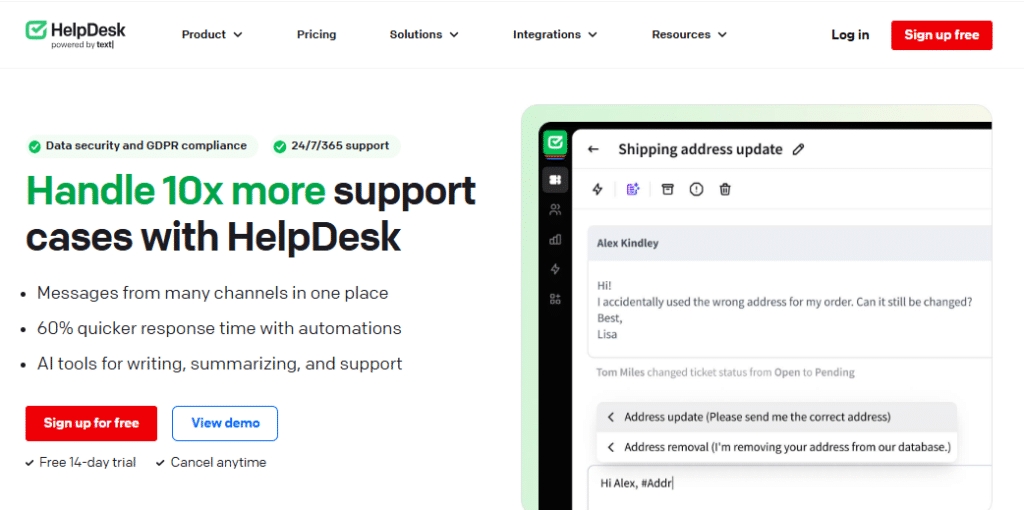
The main thing that happens in any helpdesk system is the creation of a “ticket”. A ticket is just a digital file for a customer’s problem. For every single request that comes in, whether a customer emails about a broken feature, tweets about a bill, or starts a live chat, it is instantly turned into a tracked, managed, and resolvable ticket inside the system.
This core function guarantees several crucial outcomes for your business:
Zero Missed Requests: Every inquiry is automatically logged, making sure nothing is forgotten, no matter which channel the customer used.
Clear Accountability: Every ticket is either automatically sent or manually assigned to a specific support agent or team. This makes it clear who is responsible for solving the problem from start to finish.
Complete Context: A ticket automatically keeps the full history of that customer’s interactions—past purchases, old problems, and all previous conversations. This way, the agent instantly knows the whole story without making the customer repeat themselves. This saves the customer time and frustration and speeds up the solution.
Evolution from HelpDesk to Service Desk
The name “help desk” is still used, especially for IT support inside a company (where employees ask for help with tech), but the newer version is often called a “service desk.” This name change shows that the tool does much more now.
Today’s tools don’t just “fix” problems; they manage the entire “service experience.” This means handling not just technical glitches but also managing sales questions, general information requests, new feature ideas, and even acting as the first stop for departments like HR. This change proves that service is a key business strategy, not just a cost. Good service directly leads to customers staying longer and loving your brand more.
Key Features of Helpdesk Software
The best helpdesk tools have features that make your support team work better, grow easily, and be more helpful. These features manage the large number of messages and make sure the quality stays high, no matter how many customers you have.. These features are necessary and are the backbone of your entire support operation:
1. Omnichannel Unification
In the past, a support team might use many different apps for email, chat, and phone calls. This was confusing and led to bad customer experiences.
Omnichannel unification fixes this by taking requests from every channel—email, phone, text (SMS), social media (like Facebook and X/Twitter), live chat, and WhatsApp—and putting them all into one single, unified ticket in the agent’s view. The agent sees one continuous chat history, even if the customer switched channels. This saves the agent time and makes sure the customer gets consistent, informed support.
2. Service Level Agreement (SLA) Management
An SLA (Service Level Agreement) is a promise you make to customers about how fast you will reply and solve their problems. The helpdesk software manages these promises easily. You can set time limits for when a ticket must be first answered (First Response Time) and when it must be fully solved (Resolution Time).
These limits can be based on how urgent the problem is or what kind of contract the customer has. The system then tracks these deadlines automatically, sending warnings or escalating the ticket (like sending it to a manager) if the time is running out. This is totally essential for meeting your promises and keeping customer trust.
3. Collaboration Tools
Support problems often need more than one person to solve them. A bug might need a developer, or a billing question might need finance. Collaboration tools, like private notes (comments only agents see) and agent mentions (@engineer_name), let support agents talk to other teams right inside the ticket.
These internal talks are hidden from the customer, so agents can quickly get accurate answers without confusing the customer. The best systems also have Collision Detection, a simple but important alert that shows when another agent is working on the same ticket. This stops two people from accidentally sending two different answers!
The Pricing of Helpdesk Solutions
Choosing the right helpdesk means looking at all the features and, very importantly, understanding the cost. Most helpdesk software uses a simple pricing plan: you pay a set amount per agent, per month. This means your cost goes up or down with the size of your support team.
For instance, if a tool’s plan costs $49 per agent/month, and you have 15 full-time agents, your basic cost is $735 per month. Most companies give you a good discount (about 10% to 20%) if you pay for a whole year at once, which is a smart move for long-term planning.
Navigating the Tiered Pricing Structure
Companies selling helpdesk tools almost always have three or four pricing plans (tiers). Each plan is built for a different size of business and unlocks more powerful features.
| Tier Name | Typical Price Range (Per Agent/Month, Billed Annually) | Core Focus & Features Unlocked | Ideal Business Size |
|---|---|---|---|
| Free/Starter | $0 (Limited Seats, e.g., 2-5) | Basic email-to-ticket creation, simple knowledge base, basic reports. Very little automation. | Startups, hobby projects, or teams testing the idea. |
| Growth/Basic | $15 – $30 | Adds live chat, basic workflow automation (macros, simple rules), support for multiple channels (email, chat), and SLA tracking. | Small to Mid-Sized Businesses (SMBs) with growing volume. |
| Professional/Business | $40 – $75 | Strong SLA management, advanced rule-building, full performance dashboards, custom agent roles, deep connection with CRM tools, and access to AI Copilots. | Mid-market companies with complex service needs. |
| Enterprise | $90+ (Often Custom Quote) | Support for multiple brands, dedicated account manager, single sign-on (SSO) for security, advanced security compliance (HIPAA, GDPR), and full access to the API for custom connections. | Large corporations, global businesses, or highly regulated industries. |
It’s very important to look closely at these plans because a feature you really need—like setting up an SLA rule or getting detailed reports—might only be available in the Professional or Enterprise plan, even if your team is small.
The Salesgroup Alternative
While dedicated helpdesk tools focus entirely on fast and high-quality service, some businesses realize they need a system that manages the customer relationship from the very first moment they become a lead (sales) all the way through their journey to support. This is where a Salesgroup platform comes in as a powerful alternative.
A Salesgroup platform is basically a huge CRM (Customer Relationship Management) system that has added support features. It is built mainly to track potential customers, manage the steps of a sales deal, and handle marketing campaigns, but it includes a helpdesk module as part of the total package.
Why Choose a Salesgroup Platform?
1. 360-Degree Customer View:
The biggest benefit is that your support team, sales team, and marketing team all look at the same, complete customer record. When a support agent opens a ticket, they instantly see what the customer has bought, who their salesperson is, and what marketing emails they’ve opened. This means the support they give is much smarter and more informed.
2. Unified Automation:
You can set up smart rules that work across different departments. For example, if a customer gives a very low satisfaction score on a support ticket, the system can automatically create a reminder for their sales rep or account manager to call them.
3. Focus on Growth:
These systems are designed to link every customer talk back to your company’s growth and revenue. This gives managers a much clearer picture of how excellent support helps the company make more money and retain customers.
However, keep in mind that even though a Salesgroup tool includes a helpdesk, its support features might not be as deep or specialized in complex ticketing and IT rules as a system built only for support. The choice is really between a specialized, deep tool (Helpdesk) and a broader, all-in-one system (Salesgroup).
Conclusion
We’ve looked closely at modern helpdesk software, from the basics of tickets and SLAs to the smart use of AI and detailed performance reports. Getting a good helpdesk tool is a must for any company that cares about keeping customers happy, because it provides the structure to turn confusing communication into organized, high-quality, and scalable service.
By putting all interactions in one place, automating boring tasks, and letting customers help themselves, these tools directly lead to happier customers and smoother internal work.The future of service is moving quickly toward very smart, personal support delivered by AI and connecting support data directly with sales and marketing teams.
As you choose your tool, remember that a dedicated helpdesk is great, but for businesses that want to link their entire communication, customer relationship, and revenue process, a strong Salesgroup platform can be a powerful choice. A Salesgroup tool gives you many features for sales, management, and support all in one place, offering a different, but very effective, way to handle customer relationships.
