

How to Create Customer Surveys: Tips & Templates
Creating customer surveys is a powerful way to gather insights directly from your audience, helping businesses understand their needs, preferences, and pain points. Whether you’re launching a new product, improving your services, or enhancing customer satisfaction, a well-designed survey can provide actionable feedback to guide your decisions.
In this guide, we’ll walk you through the essential steps of creating effective customer surveys, from choosing the right questions to selecting the best tools for distribution. By the end, you’ll be equipped to create surveys that not only engage your customers but also deliver meaningful data to drive your business forward.
Table of Contents
What Are Customer Surveys?
Customer surveys are structured questionnaires designed to collect feedback, opinions, and insights directly from customers about their experiences, preferences, and satisfaction levels.
They serve as a vital tool for businesses to understand their audience, identify areas for improvement, and make data-driven decisions. These surveys can cover various topics, such as product quality, customer service, pricing, or overall brand perception.
Delivered through methods like online forms, emails, or in-person interviews, customer surveys help businesses build stronger relationships by showing customers that their input is valued and acted upon.
The Importance of Customer Surveys for Business Growth
- Understanding Customer Needs
Customer surveys provide direct insights into what your customers want, helping you tailor your products, services, and strategies to meet their expectations effectively. - Improving Customer Satisfaction
By identifying pain points and areas for improvement, surveys enable businesses to take targeted actions that enhance customer satisfaction and loyalty. - Driving Innovation
Feedback from surveys can uncover new opportunities, such as untapped markets, product improvements, or service enhancements, fostering innovation and staying ahead of competitors. - Enhancing Customer Retention
Addressing issues highlighted in surveys shows customers that their opinions matter, building trust and reducing churn rates by creating a more personalized experience. - Informed Decision-Making
Surveys provide data-driven insights that support strategic planning, helping businesses make smarter, more informed decisions that align with customer preferences and market trends.
Types of Customer Surveys
Customer surveys come in various types, each designed to serve a specific purpose. Here are the most common types:
- Customer Satisfaction Surveys (CSAT)
Measure how satisfied customers are with a product, service, or specific interaction. These surveys often use simple scales, such as a rating from 1 to 5 or a happy/sad face system. - Net Promoter Score (NPS) Surveys
Assess customer loyalty by asking how likely they are to recommend your business to others, using a scale from 0 to 10. - Customer Effort Score (CES) Surveys
Evaluate how easy it is for customers to resolve issues, make purchases, or interact with your business. Lower effort indicates a better experience. - Market Research Surveys
Gather data on customer demographics, preferences, and buying behaviors to understand your target audience better and refine your marketing strategies. - Post-Transaction Surveys
Collect feedback immediately after a purchase or service interaction to gauge customer satisfaction with the experience and identify areas for improvement. - Product Feedback Surveys
Focus on understanding customer opinions about a specific product or feature, helping businesses improve design, usability, or functionality. - Employee Feedback Surveys (as part of the customer journey)
Evaluate how employees feel about their interactions with customers, identifying ways to improve customer service quality and satisfaction.
Each type serves a unique role in gathering insights, allowing businesses to address specific challenges and opportunities effectively.
Steps to Create an Effective Customer Survey
To create an effective customer survey using the SalesGroup AI platform, follow these steps:
Sign Up on SalesGroup AI
Visit the SalesGroup AI website and sign up to create your account. Once registered, log in to access your AI-powered dashboard.
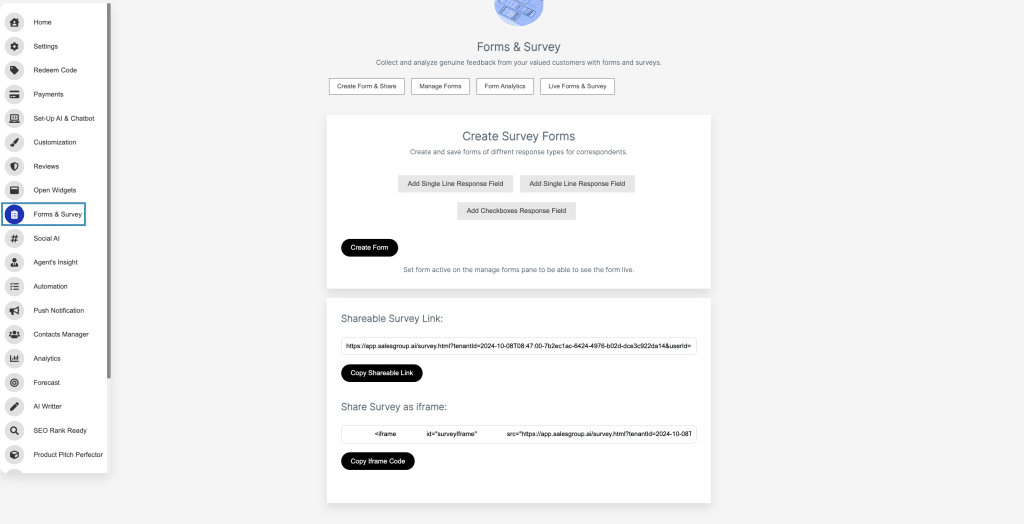
Navigate to the Forms & Survey Section
On the left-hand menu of the dashboard, locate and select the “Forms & Survey” option.
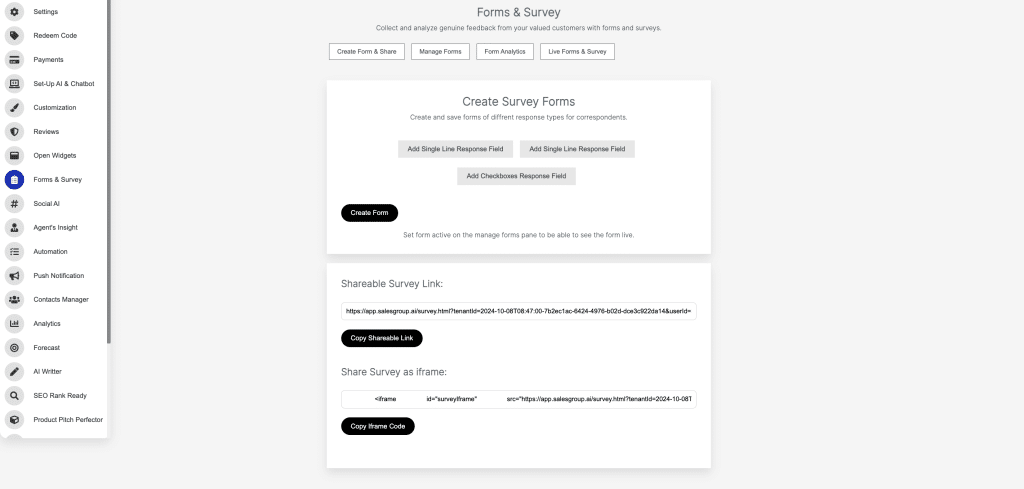
Create a New Survey Form
Use the “Create Form” option to design your survey. You can add response fields like single-line responses, multi-line responses, or checkboxes to tailor your survey to specific feedback needs.
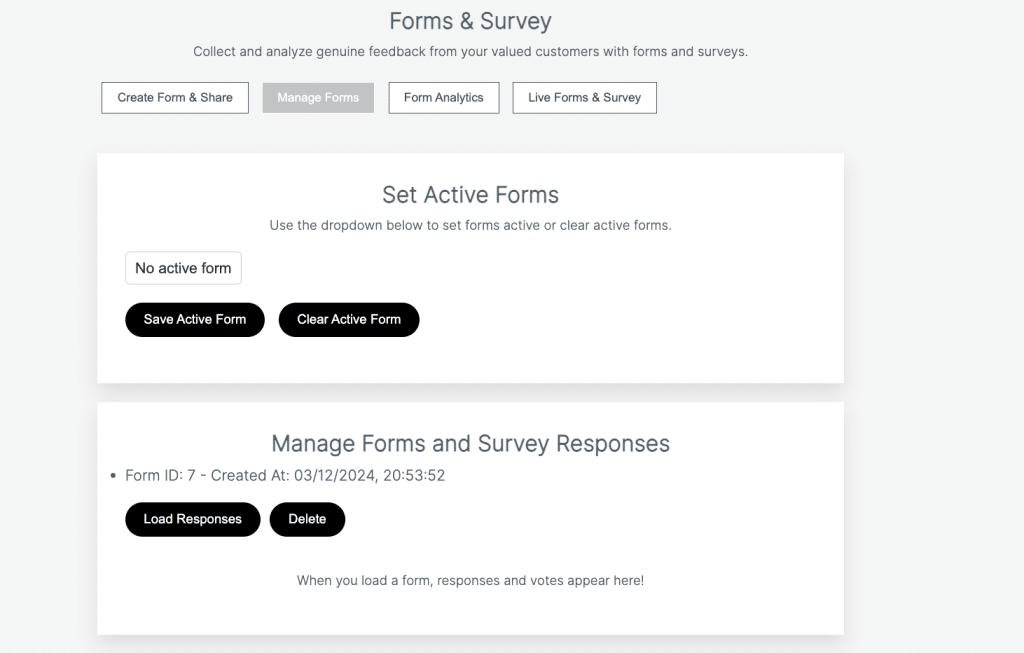
Activate the Form
After creating the survey, navigate to the “Manage Forms” section to activate it. This ensures the form is live and ready for respondents.
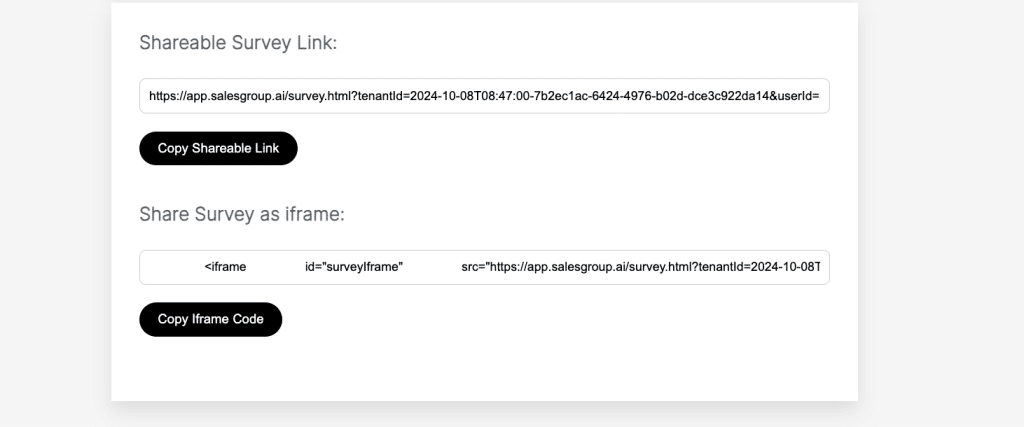
Share the Survey
Use the “Shareable Survey Link” or the “Share Survey as iframe” option to distribute the survey. Copy the link or iframe code provided and share it with your audience via email, website, or social media.
Form Analytics
This feature likely provides detailed insights into the performance of your survey forms. It may include metrics such as:
- Number of responses received.
- Response rates over time.
- Completion rates for surveys.
- Breakdown of answers to specific questions, helping you analyze trends or patterns in customer feedback.
Form Analytics is essential for evaluating how well your surveys are performing and identifying areas for improvement.
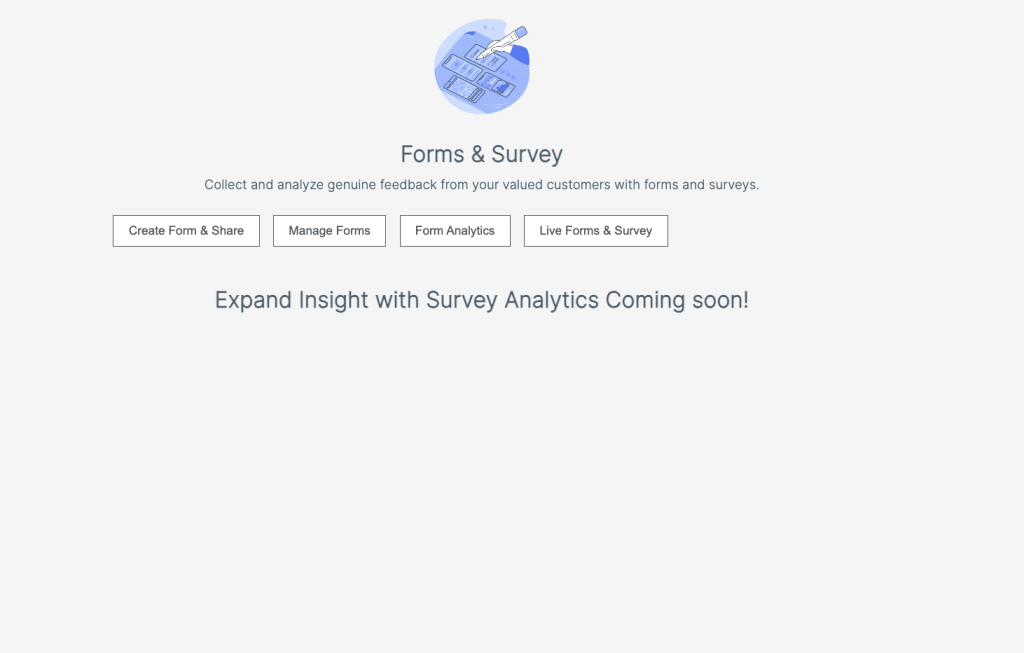
Live Forms & Survey
This feature might allow you to monitor active surveys in real-time. It could include functionalities such as:
- Viewing live responses as they are submitted.
- Checking the status of active surveys (e.g., number of respondents currently filling out the survey).
- Ensuring that live surveys are functioning correctly.
This tool ensures that you can manage and track ongoing surveys effectively, making real-time adjustments if needed.
How to Define Your Survey Goals and Objectives
Defining clear goals and objectives is a critical first step in creating an effective customer survey. Here’s how to do it:
1. Identify the Purpose of the Survey
Ask yourself why you are conducting the survey. Is it to measure customer satisfaction, gather product feedback, or understand market trends? Clearly define the main purpose to guide the survey’s design.
2. Specify the Target Audience
Determine who the survey is intended for new customers, loyal customers, or a specific demographic. Knowing your audience helps in crafting relevant questions.
3. Set Measurable Outcomes
Define what success looks like. For example, you may aim to identify the top three areas where customers face challenges or achieve a minimum response rate for meaningful insights.
4. Focus on Key Insights
Pinpoint the exact information you want to collect. Whether it’s customer opinions on a new feature or their experience with your service, focus on gathering actionable data.
5. Align with Business Goals
Ensure the survey goals tie back to broader business objectives, such as increasing customer retention, boosting sales, or improving product development.
Choosing the Right Survey Format: Online, Email, or In-App
The format of your survey depends on your target audience and goals:
- Online Surveys: Ideal for reaching a broad audience. Tools like Google Forms or SurveyMonkey make it easy to share links on social media or websites.
- Email Surveys: Best for engaging existing customers or those who’ve opted into your mailing list. They’re effective for post-purchase feedback or loyalty program participants.
- In-App Surveys: Perfect for collecting real-time feedback during a user’s interaction with your app or website, ensuring a high response rate.
How to Write Clear and Concise Survey Questions
- Use simple, direct language to avoid confusion.
- Keep questions short and focused on one topic.
- Avoid leading or biased questions that might influence answers.
- Offer balanced response options (e.g., “Very Satisfied” to “Very Dissatisfied”).
- Pilot your survey with a small group to test clarity before distributing it widely.
Open-Ended vs. Closed-Ended Questions: When to Use Each
- Open-Ended Questions: Use these when you want detailed, qualitative feedback. For example, “What improvements would you like to see in our product?”
- Closed-Ended Questions: Ideal for gathering quantitative data that’s easy to analyze. Examples include yes/no questions, multiple-choice, or rating scales.
- Use open-ended questions sparingly, as they require more effort from respondents and are harder to analyze.
Tips for Designing a User-Friendly Survey
- Keep It Short: Limit surveys to 5-10 questions to respect users’ time.
- Use Logical Flow: Group related questions and maintain a natural progression.
- Optimize for Mobile: Ensure your survey is mobile-friendly to capture responses on the go.
- Provide Clear Instructions: Guide respondents on how to complete the survey.
- Test Before Launch: Ensure the survey works seamlessly on various devices.
How to Incentivize Customers to Complete Surveys
- Offer Discounts: Provide a percentage off their next purchase.
- Enter a Giveaway: Create a raffle for participants to win a prize.
- Reward Points: Use loyalty points as an incentive for completing surveys.
- Exclusive Content: Offer access to a whitepaper, eBook, or premium content.
- Show Gratitude: A simple thank-you note or small token can motivate responses.
Common Mistakes to Avoid When Creating Customer Surveys
When creating customer surveys, avoiding common mistakes can ensure that the survey provides valuable and actionable feedback. Here are some key mistakes to steer clear of:
1. Asking Too Many Questions
- Mistake: Overloading respondents with a long list of questions can lead to survey fatigue and low response rates.
- Solution: Keep surveys concise and focused on the most essential information. Aim for no more than 5-10 questions to respect your audience’s time.
2. Using Complex or Ambiguous Language
- Mistake: Using jargon, overly technical terms, or unclear phrasing can confuse respondents and lead to inaccurate answers.
- Solution: Write questions in simple, easy-to-understand language, and avoid using terms that may be unfamiliar to your audience.
3. Asking Leading or Biased Questions
- Mistake: Questions that suggest a particular answer can skew results and compromise the integrity of the survey.
- Solution: Frame questions neutrally. For example, instead of asking, “How much did you enjoy our excellent product?” ask, “How satisfied are you with our product?”
4. Failing to Target the Right Audience
- Mistake: Surveying a broad audience without considering relevance can lead to unreliable or irrelevant responses.
- Solution: Define your target audience clearly and ensure that your survey reaches the right group of people. For example, send a product satisfaction survey only to customers who have purchased it.
5. Not Including Response Options for All Cases
- Mistake: Failing to provide an “Other” option or missing response options can leave respondents frustrated and unwilling to complete the survey.
- Solution: Include a variety of response options, and offer an “Other” field when necessary to capture responses that may not fit predefined options.
6. Neglecting Mobile Optimization
- Mistake: Creating surveys that aren’t mobile-friendly can lead to low participation, especially as many users complete surveys on their phones.
- Solution: Ensure your survey design is responsive and looks good on both desktop and mobile devices.
7. Ignoring Data Privacy Concerns
- Mistake: Not reassuring respondents about the safety of their data can lead to distrust and low response rates.
- Solution: Be transparent about how the data will be used and secure. Include a privacy policy or statement if needed.
8. Not Testing the Survey Before Launch
- Mistake: Failing to test your survey before sending it out can result in technical issues, such as broken links or errors in questions.
- Solution: Always test your survey with a small group to check for errors and ensure the questions are clear and functional.
9. Not Analyzing the Data Properly
- Mistake: Simply collecting responses without properly analyzing the data can lead to missed insights and opportunities.
- Solution: After collecting survey responses, thoroughly analyze the results and look for trends or patterns that can inform decision-making.
10. Offering Inadequate Incentives
- Mistake: Not providing enough incentive for respondents to take the time to fill out the survey can result in lower response rates.
- Solution: Offer a clear and valuable incentive, such as discounts, prizes, or exclusive content, to encourage participation.
Conclusion
customer surveys are an invaluable tool for businesses seeking to enhance their customer experience, improve products or services, and drive growth.
By setting clear goals, designing thoughtful and concise questions, choosing the right survey format, and incentivizing participation, businesses can gather actionable insights that lead to meaningful improvements.
Avoiding common mistakes such as bias in questions and overwhelming customers with lengthy surveys is also crucial. With the right approach, customer surveys can be a powerful tool for building stronger customer relationships and staying ahead in a competitive market.
