

LiveAgent Review: Features, Pricing, Pros & Cons
LiveAgent is a leading help desk software that simplifies complex customer conversations for entire teams, and that is why it is time for a LiveAgent review, so you can know whether to choose it. This is because choosing the right customer service software is a big decision, and it’s important to get it right.
In this article, our goal is to give you a simple, friendly, and very detailed LiveAgent review of core functions, key features, and pricing plans. We will explain exactly what this platform offers so you can confidently decide if it’s the right solution for streamlining your customer support and keeping your customers happy.
Let’s dive in.
What is LiveAgent?
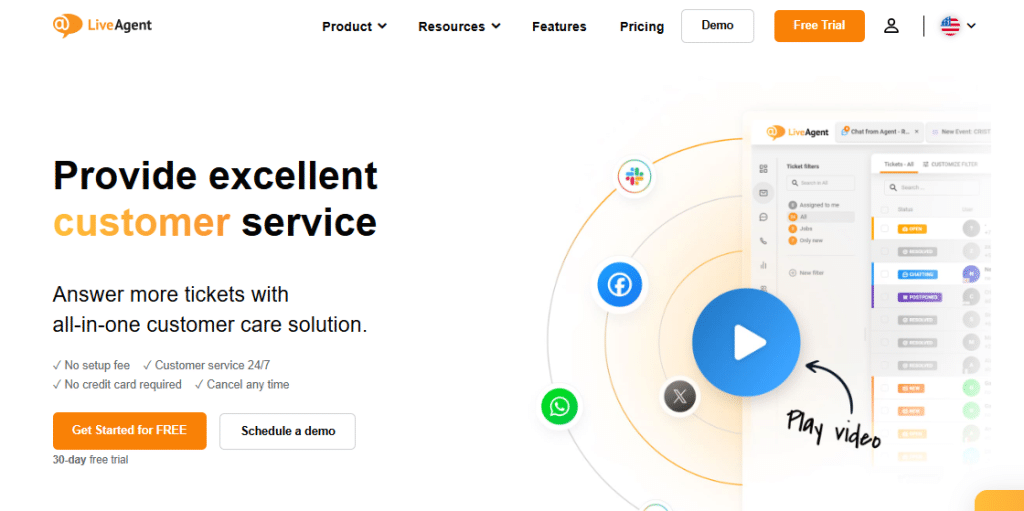
LiveAgent is a strong, all-in-one solution for customer service. You can think of it as a complete help desk system, but it does much more than just manage tickets. It’s a fully omnichannel platform built to bring all your customer conversations into one clean, simple dashboard.
If you’re trying to manage emails, live chats, social media messages, and phone calls in separate programs, you know how confusing that can be. LiveAgent fixes this problem by turning every incoming message into a ‘ticket’ inside one main, universal inbox.
This single inbox is LiveAgent’s main strength. It means that whether a customer messages you on Facebook, sends an email, or starts a live chat, your support agent sees the full conversation history in one place. This makes responses faster, more personal, and much more efficient.
LiveAgent is designed to help businesses of any size give faster, better, and more consistent support. By automating repetitive tasks and giving agents great tools for self-help and teamwork, LiveAgent helps you handle lots of customer questions without losing the personal touch.
LiveAgent Review – Core Features and Functionalities
LiveAgent has almost 200 features, making it a very complete help desk tool. Let’s look closely at the most important features and how they help your team provide better customer service.
1. Universal Inbox and Ticketing System
The foundation of LiveAgent is its Universal Inbox. This feature takes every incoming question from any channel (email, chat, social media, phone) and turns it into a standard support ticket, all landing in one shared workspace.
Agents don’t have to jump between apps, which speeds up response times and makes sure no customer is forgotten. The system is smart, too. It has agent collision detection, which stops two people from working on the same ticket at once, and it can automatically send tickets to the right agent based on who is available or who has the right skills.
2. Real-Time Live Chat and Proactive Invitations
Live chat is the fastest way customers look for help. LiveAgent’s chat is designed to load quickly and offers chat buttons you can easily change to match your website. Agents can even see what a customer is typing before they hit send, which helps them prepare a faster answer. The best part is the Proactive Chat Invitation.
You can set up rules to automatically start a chat with a visitor based on what they are doing—for example, if they stay on your pricing page for a long time. This changes support from waiting for problems to actively engaging customers and can help increase sales.
3. Built-in Call Center Functionality
Unlike many rival tools that need extra phone software, LiveAgent has a strong, built-in call center starting with its Medium plan. This means you can handle incoming and outgoing phone calls right from the same dashboard you use for emails and chats.
It includes features like Interactive Voice Response (IVR), which lets you create a custom phone menu (like “Press 1 for Sales”). Every call is turned into a ticket and recorded, so the full conversation, spoken or written, is saved with the customer’s history.
4. Customer Portal and Knowledge Base
One of the best ways to lower the number of support tickets is to help customers help themselves. This is what the Customer Portal and Knowledge Base do. LiveAgent lets you build a complete, searchable help center with FAQs, guides, and documents in many languages. This greatly cuts down on easy, repetitive questions, letting your agents focus on bigger issues. Higher plans also include a Community Forum, where customers can ask each other questions, helping to build a supportive community around your brand.
5. Advanced Automation and Workflow Rules
Support work becomes much faster with automation. LiveAgent offers strong, customizable rules to handle routine tasks. These automation Rules use simple logic (If this happens, then do that) to manage many situations automatically, like setting a ticket’s priority or sending it to the right team based on keywords.
Time Rules are used for time-based actions, such as automatically closing old tickets or sending reminders to agents if a guaranteed response time (SLA) is about to pass. This automated system keeps tickets moving, keeps agents responsible, and ensures customers get fast, consistent help.
6. Gamification and Agent Motivation
Customer service can be hard work, so LiveAgent uses Gamification to keep agents motivated. This feature turns daily support tasks into a friendly competition by giving agents points, badges, and rankings for good work—like closing tickets quickly or getting high customer satisfaction scores.
The system tracks key numbers and shows them on leaderboards, which encourages agents to keep improving, leading directly to better service quality.
7. Reporting, Analytics, and AI Capabilities
It’s important to understand your data. LiveAgent provides detailed Reporting and Analytics tools that give managers a clear view of how the team is performing, how satisfied customers are, and which channels are working best. You can track things like how fast the first reply is, how long it takes to solve an issue, and customer satisfaction (CSAT) scores.
Recently, LiveAgent added AI Answer Assistant and AI Chatbot features. The AI Assistant helps agents by suggesting replies or articles, speeding up ticket response. The AI Chatbot can handle simple questions completely on its own, giving customers instant answers 24/7.
LiveAgent Setup Experience and Usability
LiveAgent is known for having a clear and simple interface, making it easy for businesses of all sizes to use without much technical training. Even though some users say the first setup can take time because there are so many features, the platform is easy to use every day.
The combined agent dashboard means less screen-switching and manual work for your team. Training new support staff is usually quick once the main settings and routing rules are in place. One thing to note is that some users report the mobile app for agents doesn’t always have the full functions or ease of use of the computer version.
LiveAgent Pricing Structure and Plans
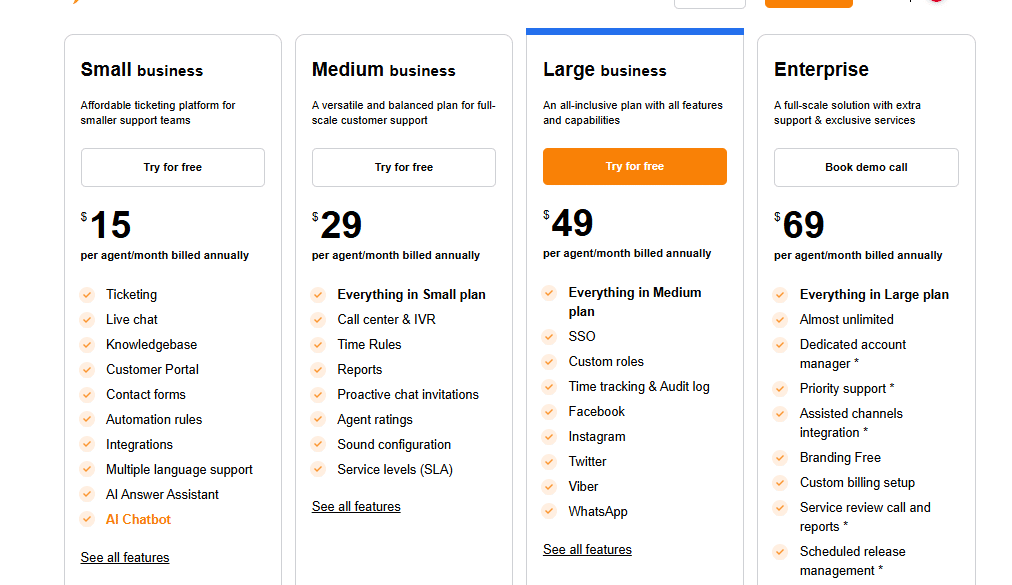
There is no LiveAgent review without a pricing review. LiveAgent uses a simple price model based on how many agents you have per month. This makes planning your budget easy. They offer four main paid plans and a useful free version. The prices below are the monthly cost when you pay for a full year (which saves you money). Paying month-to-month costs a little more per agent.
| Plan Name | Monthly Cost (per agent, billed annually) | Key Inclusions | AI & Automation Limits | Notable Limitations |
|---|---|---|---|---|
| Free Plan | $0 | Email ticketing, one live chat button, one phone number, customer portal. | Basic ticketing rules. | Only 7 days of ticket history, no advanced reports, no social media. |
| Small Business Plan | $15 | Full ticketing system, live chat, Knowledge Base, basic automation rules, AI Answer Assistant. | Full ticketing and chat automation rules. | No built-in Call Center and no social media connection. |
| Medium Business Plan | $29 | Everything in Small plan, plus Built-in Call Center & IVR, Proactive Chat Invitations, Reports, and SLA management. | Full reporting and time-based rules. | Social media connection is still missing. |
| Large Business Plan | $49 | Everything in Medium plan, plus Full Social Media Integration (Facebook, Instagram, X/Twitter, WhatsApp), SSO, Custom Roles, Time Tracking. | Full connection for all channels. | For highest volume and priority help, you need the Enterprise plan. |
| Enterprise Plan | $69 | Everything in Large plan, plus much higher limits, Dedicated Account Manager, Priority Support, and no LiveAgent branding. | Unlimited and full control over rules and workflows. | Needs a minimum number of agents for some exclusive benefits. |
LiveAgent Pros and Cons: A Balanced Perspective
LiveAgent has many strengths, especially for businesses that use all communication channels for support. However, like any big platform, there are a few areas where users think it could be better.
Key Strengths
True Omnichannel Service: Easily combines email, live chat, phone, and social media into one main ticket inbox.
Good Price to Start: The cost is fair, and valuable features like the built-in call center start at the Medium plan ($29/agent/month).
Powerful Ticketing Features: Includes important tools like agent collision detection, departments, guaranteed response times (SLAs), and gamification.
Complete Self-Service: Offers a great customer portal, knowledge base, and community forums, which greatly reduces the number of tickets.
Scalable for Support: The clear, tiered pricing makes it simple to add new functions (like phone or social media) as your support team grows.
Areas for Improvement
Complexity and Initial Setup: The large number of features can make the first setup and customization feel complicated or take a long time for people who are not very technical.
Mobile App Experience: Some users say the mobile apps for agents can be slow or don’t have all the functions of the computer version.
Integration Limitations: While it has many connections, its total number of integrations (around 200+) is smaller than what some larger rivals offer.
Conclusion
LiveAgent is clearly a top-notch customer support and help desk solution. It does a great job of combining all communication channels into one system (omnichannel), managing tickets efficiently, and offering advanced self-service tools. This platform is built to help you keep customers loyal and provide fast support.
If you are looking at comprehensive customer support and find LiveAgent appealing but want to explore other strong, all-in-one alternatives that also focus on unifying service channels, you should choose Salesgroup.
Salesgroup offers tools designed to help manage customer interactions effectively, often featuring unified dashboards and solutions to keep support teams connected and efficient, making it a viable alternative to explore in your continued research for the perfect customer service platform.
