

Tips for building a Great Knowledge Base Chatbot
A knowledge base chatbot is a powerful tool that enables businesses to meet these expectations while reducing support costs and increasing customer satisfaction. Unlike traditional support systems, knowledge base chatbots provide instant, context-aware responses, using pre-fed data and AI to assist customers efficiently.
But building an effective knowledge base chatbot requires more than just integrating AI—it takes careful planning, training, and continuous optimization. This guide explores everything you need to know to build a chatbot that enhances customer experience and supports your business goals.
What is a Knowledge Base Chatbot?
A knowledge base chatbot is a virtual assistant powered by artificial intelligence (AI) and machine learning that interacts with users by delivering instant answers from a structured knowledge base. Instead of contacting a human agent, customers ask questions through the chatbot and receive automated, intelligent responses.
These chatbots are trained using existing resources such as FAQs, help articles, manuals, and documentation. Their primary purpose is to make information accessible in a conversational format that feels natural and helpful.
Why You Need a Knowledge Base Chatbot
1. 24/7 Customer Support
Unlike human agents, chatbots don’t sleep. They offer uninterrupted support to your customers around the clock. This means customers from different time zones or with urgent needs outside business hours can still get the assistance they need. With a chatbot, your support becomes more accessible, responsive, and dependable.
2. Cost-Efficiency
Hiring and training human support agents can be expensive. A chatbot significantly reduces the need for large support teams by handling repetitive queries. This cost-saving feature makes chatbots an attractive option for startups and large enterprises alike. One well-trained bot can do the job of several humans for a fraction of the cost.
3. Scalability
A knowledge base chatbot can handle thousands of queries simultaneously. Unlike human agents who may get overwhelmed during high-traffic periods, chatbots provide consistent and scalable customer support without delays. As your business grows, your chatbot grows with it, making it easy to manage rising customer inquiries.
4. Consistency in Responses
Chatbots follow a predefined structure and language model, ensuring that responses remain consistent, accurate, and aligned with your brand voice. Unlike human agents who may vary in tone and accuracy, chatbots reduce the risk of miscommunication and ensure high-quality responses every time.
5. Improved Customer Experience
By delivering immediate answers and reducing wait times, chatbots boost customer satisfaction. They also enhance the user experience by making support intuitive and effortless. With features like natural language processing, chatbots understand user intent, making interactions smoother and more productive.
Key Components of a Great Knowledge Base Chatbot
1. Well-Structured Knowledge Base
A chatbot is only as good as the information it can access. Your knowledge base should be detailed, accurate, and organized logically. Group similar topics together, ensure articles are up-to-date, and make content easy to understand. The clearer your knowledge base, the more helpful your chatbot will be.
2. Natural Language Processing (NLP)
NLP allows the chatbot to interpret and respond to user input in a conversational manner. It understands slang, typos, and context, providing a more human-like experience. Investing in NLP technology enables your chatbot to understand user queries accurately and respond appropriately.
3. Intelligent Search Functionality
Your chatbot should be able to quickly search and pull relevant information from your knowledge base. Implementing semantic search ensures that the chatbot doesn’t just match keywords but understands the context and intent behind queries.
4. User-Friendly Interface
Your chatbot should be easy to interact with. The interface must be clean, intuitive, and mobile-friendly. Users should be able to initiate conversations, type questions naturally, and receive clear answers without confusion or friction.
5. Escalation to Human Agents
No matter how smart your chatbot is, it can’t solve everything. It should know when to transfer complex or sensitive queries to a human agent. Seamless handoffs improve customer satisfaction and ensure critical issues are addressed properly.
6. Analytics and Feedback Loops
To continuously improve your chatbot, you need to analyze interactions. Track metrics like response accuracy, completion rates, and user satisfaction. Also, collect user feedback to understand what’s working and what needs to be improved.
Step-by-Step Guide to Building Your Knowledge Base Chatbot
Step 1: Define Goals and Use Cases
Start by identifying the primary function of your chatbot. Is it for customer service, product support, or onboarding? Knowing the goal helps define the scope of content and design. Choose specific, measurable outcomes like reducing support ticket volume or increasing self-service rates.
Step 2: Audit and Organize Existing Content
Evaluate your current help center or FAQ pages. Identify gaps, outdated information, and articles that need rewriting. Structure content logically and label it clearly with keywords. A well-organized knowledge base is crucial for accurate and helpful chatbot responses.
Step 3: Choose the Right Platform
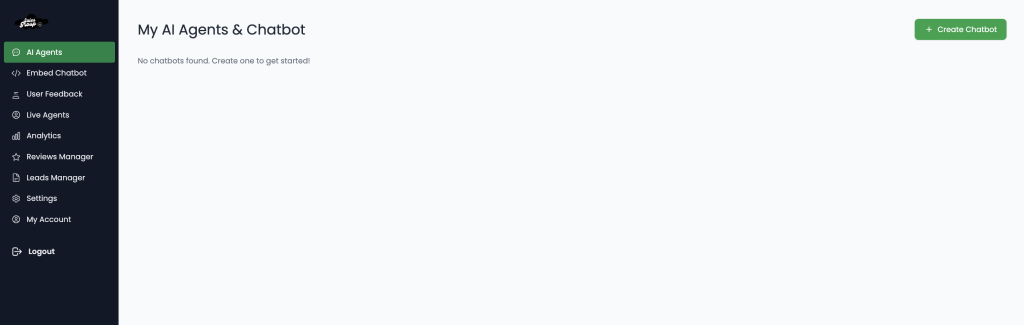
Select a chatbot platform that supports AI and integrates easily with your existing knowledge base and CRM. Look for tools with NLP, analytics, and customization options. Popular platforms include Intercom, Drift, Zendesk, Freshchat, and HubSpot.
Step 4: Train Your Chatbot
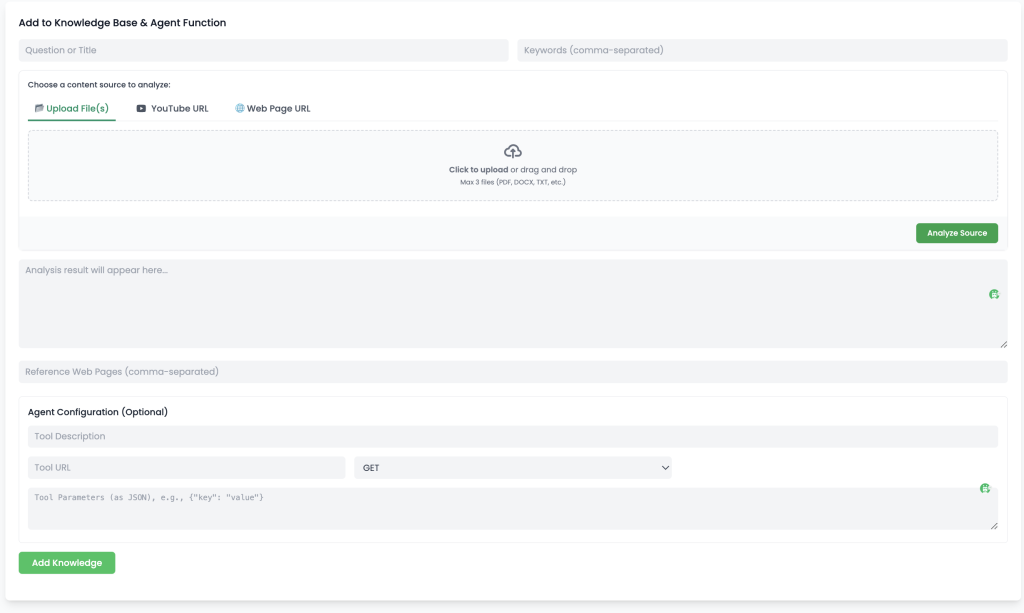
Upload and map your knowledge base content into the chatbot platform. Use machine learning models and sample queries to train the bot to understand different ways users might ask the same question. Test for relevance, tone, and clarity.
Salesgroup AI Allows you to train your Knowledge base with Frequently Asked Queries from Users
Step 5: Design Conversational Flows
Create logical conversation trees. Map out how a user might ask a question and how the bot should respond. Include follow-up questions, clarifications, and options for users to click when needed. Keep the tone friendly and the answers brief but informative.
Step 6: Test, Launch, and Iterate
Before going live, run usability tests. Use different users to simulate a range of queries. Identify weaknesses and adjust accordingly. After launch, monitor performance metrics and continue training the bot based on new data and user feedback.
Best Practices for Optimizing Knowledge Base Chatbots
1. Update Content Regularly
Customer needs and products evolve. Keep your knowledge base updated with the latest information. Outdated articles can lead to inaccurate answers, which frustrate users. Schedule regular reviews and encourage teams to report obsolete content.
2. Maintain a Human Tone
Even though it’s AI-driven, your chatbot should sound approachable. Avoid robotic or overly formal language. Use a tone that reflects your brand personality while remaining professional and helpful.
3. Use Rich Media
Enhance answers with videos, images, and GIFs. Visual aids help clarify complex steps and improve comprehension. For example, troubleshooting guides are much more effective with annotated screenshots or explainer videos.
4. Minimize Friction
Avoid long conversations or excessive prompts. Keep responses concise and direct. Make it easy for users to switch to a live agent or leave feedback if they’re unsatisfied with the chatbot’s response.
5. Monitor for Bias and Errors
AI can sometimes inherit biases or misunderstand queries. Regularly audit chatbot behavior to ensure fairness and accuracy. Retrain models and adjust settings as needed to avoid inappropriate or misleading responses.
6. Integrate with CRM and Ticketing Systems
Connect your chatbot with backend systems to track user history, update profiles, or escalate tickets seamlessly. This integration improves context-awareness and helps human agents provide better support when taking over.
7. Encourage Self-Service Adoption
Promote the chatbot as a primary support channel. Include it on high-traffic pages and use pop-ups or prompts to guide users to use it. The more users engage with the bot, the more data it gathers to improve performance.
Measuring the Success of Your Chatbot
1. Response Accuracy
Track how often your chatbot provides the correct answer. High accuracy indicates effective training and a well-structured knowledge base. Low accuracy suggests the need for additional content or improved NLP models
2. Resolution Rate
Measure the percentage of queries resolved without human intervention. A high resolution rate reflects chatbot efficiency and user satisfaction. Continuously monitor to identify areas where users still require agent support.
3. Engagement Metrics
Monitor how users interact with your chatbot. Are they asking follow-up questions? Do they abandon conversations? Understanding behavior helps improve user flows and increase retention.
4. User Satisfaction Scores
Gather user feedback through post-interaction surveys. Ask simple questions like “Did this answer your question?” and use that data to improve. High satisfaction scores indicate the chatbot is meeting user expectations.
5. Impact on Support Tickets
Analyze the volume of incoming support tickets before and after chatbot implementation. A reduction in ticket volume indicates that users are finding answers through the chatbot, easing pressure on human agents.
Conclusion
Building a great knowledge base chatbot involves more than just technology—it requires strategic planning, continuous optimization, and a deep understanding of customer needs. When implemented correctly, a knowledge base chatbot becomes a valuable asset that boosts customer satisfaction, reduces operational costs, and scales your support effortlessly.
From structuring content and leveraging AI to testing and analyzing performance, this guide provides the blueprint to creating a chatbot that truly enhances your customer experience. Start small, iterate often, and always keep your users at the center of your chatbot strategy.
