

FAQ Chatbot: Definition, Benefits, Types & Use case
FAQ chatbot are great ways to help alleviate the challenges customer support face while interacting with customers
One of the most annoying challenges customer support teams face daily is having to give repetitive answers to different customer queries. Support agents find themselves explaining the same basic information about return policies, account setup, or troubleshooting steps dozens of times each day. This endless cycle of repetition not only drains team morale but also wastes valuable time that could be spent solving more complex customer issues.
FAQ chatbots address this challenge directly. These intelligent virtual assistants can handle routine questions automatically, freeing human agents to focus on what they do best: solving unique problems that require critical thinking and empathy.
What is an FAQ Chatbot?
An FAQ chatbot is an AI-powered conversational interface that can understand customer questions and automatically provide relevant answers from a company’s knowledge base. Unlike basic FAQ pages that require customers to search through multiple sections, chatbots deliver instant, conversational responses that simulate human interaction.
Modern FAQ chatbots use natural language processing (NLP) to understand the intent behind customer queries, even when phrased differently than expected. They can be deployed across multiple channels – websites, messaging apps, social media platforms – to provide consistent support wherever customers need assistance.
5 Key Benefits of FAQ Chatbots
1. 24/7 Customer Support Availability
FAQ chatbots provide round-the-clock assistance without human limitations. Customers can get answers anytime, regardless of time zones or business hours. This constant availability meets modern expectations for immediate support, reduces frustration during off-hours, and prevents customers from abandoning purchases when questions arise outside normal business hours.
2. Dramatic Cost Reduction
Implementing chatbots significantly lowers support costs. The average human support interaction costs $7-$13, while chatbot interactions typically cost $0.25-$0.50. By handling 70-80% of routine questions, chatbots allow businesses to scale support without proportionally increasing staff costs. Most organizations see positive ROI within 6-9 months of implementation.
3. Enhanced Data Collection and Customer Insights
Chatbots continuously gather valuable data about customer questions, revealing product confusion points, documentation gaps, and emerging issues. This information helps improve products, align marketing with customer terminology, and identify friction points in the customer journey. The data transforms support from a cost center into a strategic asset.
4. Improved Human Agent Job Satisfaction
When chatbots handle routine questions, human agents focus on complex, intellectually stimulating problems that require critical thinking and judgment. This reduces monotony, creates clearer career progression paths, and improves performance metrics. Companies typically report 20-35% reductions in support staff turnover after implementing FAQ chatbots.
5. Consistent Customer Experience
Chatbots deliver uniform information across all channels—website, mobile app, messaging platforms, and social media. This consistency eliminates the frustration of receiving different answers from different representatives or through different contact methods. When policies change, updates to the chatbot knowledge base immediately apply everywhere, ensuring customers always receive correct information.
Types of FAQ Chatbots
1. Rule-Based Chatbots
Rule-based chatbots operate on predefined rules and pattern matching. They follow a structured decision tree with if/then logic to determine responses based on specific keywords or phrases in customer queries.
Key characteristics:
- Work with predetermined pathways and scripted responses
- Use keyword recognition to identify query intent
- Cannot handle questions outside their programmed scenarios
- Require manual updates to expand capabilities
Best for: Organizations with well-defined, predictable customer questions and limited variation in how these questions are asked. Ideal for smaller businesses or specific use cases where the scope of potential questions is narrow and well-understood.
Example: A simple e-commerce chatbot that recognizes keywords like “order status” or “return policy” and provides corresponding information from a fixed response database.
2. AI-Powered (NLP) Chatbots
AI-powered chatbots use Natural Language Processing (NLP) and Machine Learning to understand the intent behind customer queries, even when phrased in unexpected ways.
Key characteristics:
- Can understand variations and natural language
- Learn from interactions to improve over time
- Handle complex sentence structures and context
- Recognize user intent rather than just keywords
- Capable of maintaining context throughout conversations
Best for: Organizations with diverse customer bases who phrase questions in many different ways. Suitable for companies with complex products or services that generate a wide variety of customer inquiries.
Example: A sophisticated customer service chatbot that can understand a question like “I’m not happy with what I bought last week” as a return request, even though it contains no explicit keywords about returns.
3. Hybrid Chatbots
Hybrid chatbots combine rule-based logic with AI capabilities, offering the reliability of programmed responses while maintaining the flexibility to handle unexpected queries.
Key characteristics:
- Use rules for common, straightforward scenarios
- Employ AI for handling variations and complex queries
- Can switch between modes based on conversation complexity
- Offer more predictable performance than pure AI solutions
- Maintain the ability to learn and improve over time
Best for: Organizations seeking balance between reliability and flexibility. Particularly valuable for businesses with a mix of straightforward FAQs and more complex support scenarios that benefit from natural language understanding.
Example: A banking chatbot that uses rules to handle common requests like balance inquiries but switches to AI processing for more complex questions about loan eligibility or financial advice.
Key Considerations When Choosing an FAQ Chatbot
1. Business Requirements and Use Cases
Before selecting a chatbot, clearly define what you need it to accomplish. Consider your expected query volume, the complexity of typical customer questions, which channels the chatbot will operate on, and what existing systems it needs to integrate with. Understanding these fundamental requirements will prevent investing in solutions that are either too complex or insufficient for your needs.
2. Technical Capabilities and Intelligence
Evaluate the chatbot’s core technical features, particularly its natural language processing abilities. Can it understand variations in how questions are phrased? Does it support multiple languages if needed? How well does it maintain conversation context? The right level of intelligence should align with your specific customer support scenarios rather than simply offering the most advanced features available.
3. Implementation Effort and Ongoing Maintenance
Consider the resources required both for initial setup and long-term operation. How much technical expertise is needed? How easy is it to train the chatbot with your specific FAQs? Who will monitor performance and update content regularly? Even the most powerful chatbot will fail if your organization lacks the resources to properly implement and maintain it.
4. Human Handoff and Escalation Process
Evaluate how smoothly the chatbot transitions to human support when necessary. What triggers an escalation? How seamlessly is conversation history passed to human agents? The quality of this transition directly impacts customer satisfaction when the chatbot reaches its limitations, making it a critical consideration for maintaining positive customer experiences.
5. Cost Structure and Expected Return on Investment
Understand the total investment required and anticipated returns. Is pricing subscription-based, per conversation, or a one-time purchase? Are there hidden costs for integrations or advanced features? How quickly can you expect cost savings or increased customer satisfaction to offset the investment? The right solution balances cost with capabilities that deliver meaningful business value.
How to Gather FAQs from Customer Inquiries
Collecting comprehensive, accurate FAQs is the foundation of an effective customer service chatbot. This crucial first step determines how well your chatbot will address real customer needs.
Analyze Support Tickets and Inquiries
Start by examining your existing customer support data:
- Review 3-6 months of historical support tickets to identify patterns and recurring questions
- Categorize tickets by topic, product, and issue type to understand question distribution
- Identify high-volume questions that repeatedly consume support resources
- Note the specific language and terminology customers use when asking questions
- Track seasonal or cyclical patterns in question frequency (e.g., tax season questions, holiday return policies)
Extract Questions from Live Interactions
Record and analyze how customers phrase questions during live interactions:
- Review call center transcripts for common questions and conversation patterns
- Analyze live chat logs to capture how customers type their questions
- Monitor social media inquiries which often contain different question styles
- Track in-store or face-to-face questions recorded by frontline staff
- Examine email support archives for detailed customer inquiries
Involve Customer-Facing Teams
Your staff has valuable insights about customer questions:
- Conduct workshops with support agents to identify common questions they handle
- Create a shared document where staff can add questions they frequently answer
- Interview sales teams about questions that arise during the sales process
- Consult with product specialists about technical questions they encounter
- Set up regular feedback sessions to capture new and evolving questions
Analyze Search Behavior
Customer search patterns reveal what information they’re seeking:
- Review website search queries to identify what customers are looking for
- Analyze FAQ page analytics to see which questions get the most views
- Monitor product page bounce rates which may indicate unanswered questions
- Track help documentation usage to identify common information needs
- Examine app navigation patterns to spot where customers may be confused
Systematic Documentation
Organize the gathered FAQs effectively:
- Create a standardized format for documenting questions and answers
- Group similar questions together while preserving different phrasings
- Note question variations to help train the chatbot’s natural language understanding
- Record the frequency and business impact of each question
- Prioritize questions based on volume and importance to implementation planning
Validation and Refinement
Ensure your FAQ collection is accurate and comprehensive:
- Review the FAQ list with subject matter experts to ensure answers are correct
- Conduct customer surveys to identify any missing common questions
- Test the initial FAQ list with a focus group to gather feedback
- Establish a process for continuous collection of new questions
- Create a regular review cycle to keep FAQs updated as products and policies change
How to Train Your FAQ chatbot
1. Gather FAQ Questions Across Channels
Start by collecting the most common questions customers ask. Pull data from:
- Email support tickets
- Live chat transcripts
- Social media DMs and comments
- Call center logs
- Website feedback forms
- Search queries on your site
Organize them into categories like billing, product usage, account setup, delivery, etc.
2. Sign In or Sign Up
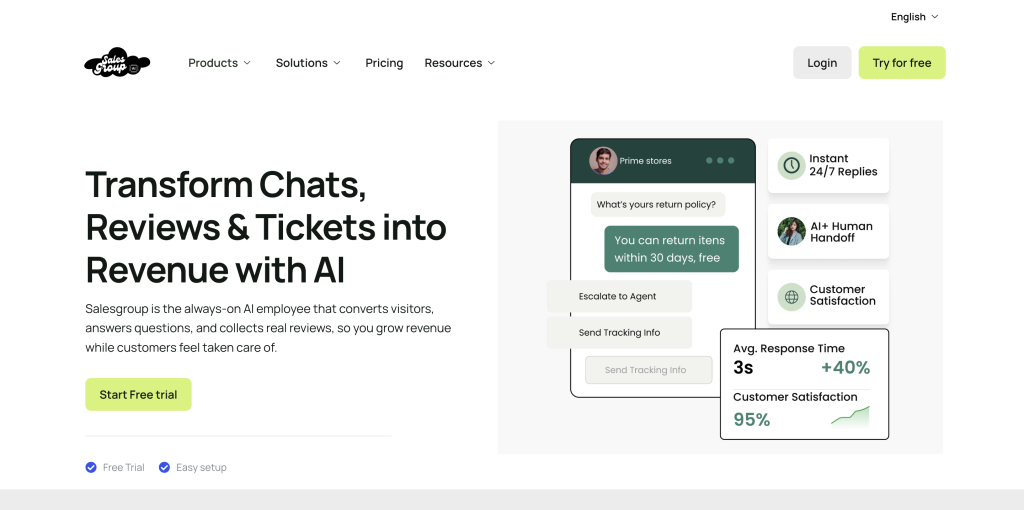
- Already have an account? Sign in to Salesgroup AI
- New here? Create an account — it’s quick and free.
3. Go to “Create Chatbot”
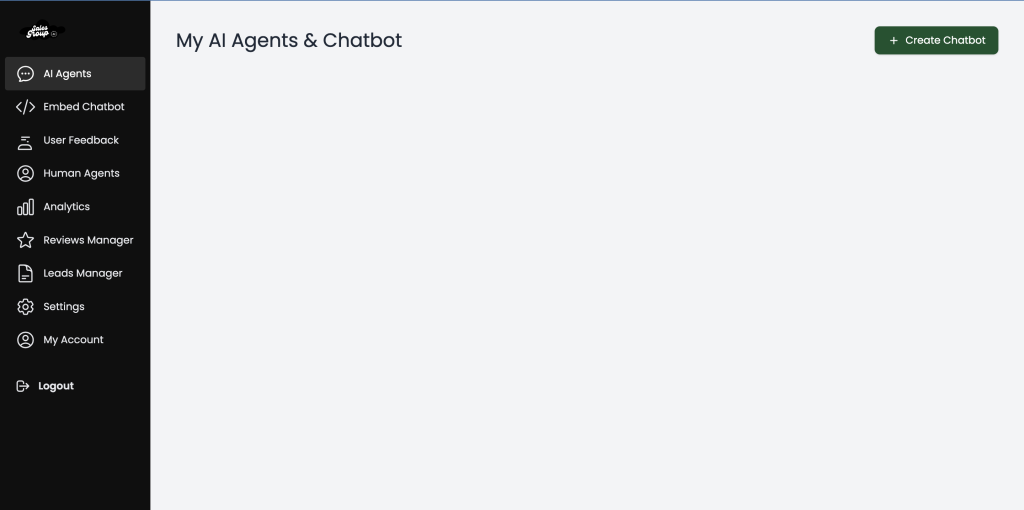
- Once you’re on the dashboard, navigate to the “Create Chatbot” tab on the top right corner of the dashboard.
- This is where you’ll provide all the information that trains your bot.
4. Upload & Connect All Relevant Resources

Now that you’ve gathered FAQs, the next step is to feed the chatbot with comprehensive content to learn from:
Link Relevant Pages
- Sitemap: Add your website’s sitemap link so the bot can crawl all your pages.
- About Us Page: Helps the bot understand your brand’s background.
- FAQ Page: Directly pull from your existing FAQs for quick wins.
Upload Files
- PDFs or documents containing product guides, user manuals, policy docs, or support knowledge base materials.
- CSV/Excel Files with structured FAQs or question-answer pairs.
Provide Context
Use the “Briefly describe your business” and “Context” sections to summarize:
- What you do
- Products or services offered
- Key pain points your customers often face
This helps the bot understand tone, relevance, and align answers to user intent.
5. Set Up Keywords as Triggers for FAQ Responses
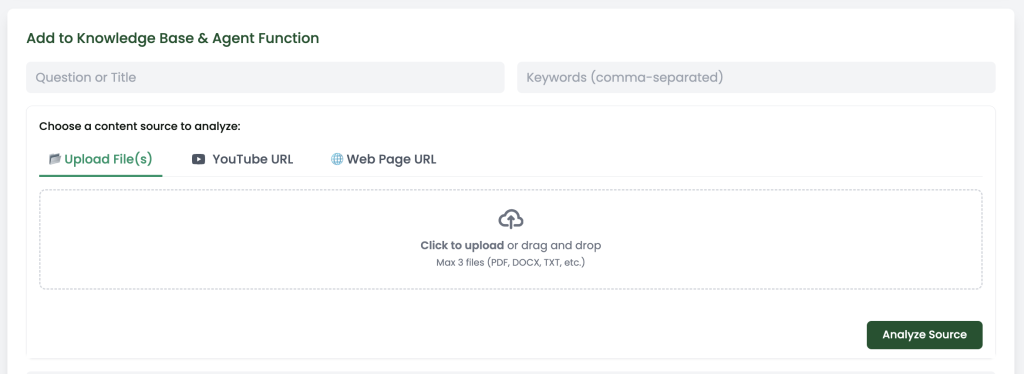
To make your chatbot respond intelligently, set keywords that trigger specific FAQ answers. Think of these as intent signals, when a customer types a word or phrase related to an issue, the bot instantly pulls the relevant response.
🔹 How to Do It:
- In the “Keywords (comma-separated)” field, input terms your customers frequently use.
- Match each keyword with a corresponding question-answer pair in your dataset (whether it’s in the uploaded files, links, or directly inputted FAQs).
🔹 Examples:
| Keyword | What it Triggers |
|---|---|
| refund | “How do I get a refund?” → Refund policy info |
| shipping delay | “Why is my order delayed?” → Shipping update info |
| cancel order | “Can I cancel my order?” → Cancellation policy |
| update account | “How can I change my email?” → Account update guide |
| discount | “Are there any ongoing promos?” → Promo codes or deals |
🔹 Pro Tip:
Include synonyms and misspellings:
- “delivery” + “shipping”
- “cancel” + “cancellation”
- “email change” + “update email” + “change my email”
This helps the chatbot understand more natural variations in how customers ask.
6. Save & Generate Code
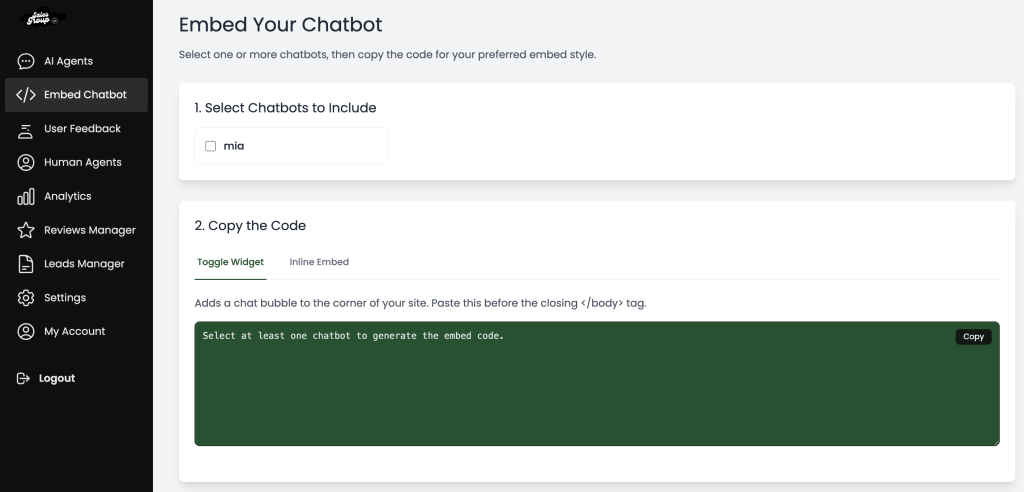
Once you’ve filled out the required fields:
- Click “Generate Code”
- Paste it into your website header
Boom — your AI-powered FAQ chatbot is live
Conclusion
Implementing an FAQ chatbot represents a strategic solution to one of customer support’s most persistent challenges: the drain of repetitive questions. By automating responses to common inquiries, businesses can improve customer experience with instant support while freeing human agents to focus on more complex, high-value work.
If you’re evaluating customer service tools and want a solution that natively includes this capability, SalesGroup AI stands out:
- Built-in intelligent FAQ automation: SalesGroup comes with a powerful FAQ chatbot that understands and answers common customer questions instantly — 24/7 — without human intervention.
- Better customer experience: Customers get real-time answers to their most frequent questions, reducing wait times and frustration while increasing satisfaction.
- Less workload for your team: With repetitive inquiries handled automatically, your support agents can focus on nuanced cases that truly require human expertise, improving morale and productivity.
- Seamless integration: SalesGroup AI fits directly into your existing support workflow, meaning you don’t need multiple tools or complicated setups to start delivering smarter support.
- Smarter over time: The chatbot learns from interactions and improves its responses, ensuring your knowledge base becomes more accurate and helpful over time.
If your goal is to boost support efficiency, enhance customer satisfaction, and reduce agent burnout with a solution that already includes an FAQ chatbot out of the box, SalesGroup AI isn’t just a tool, it’s a strategic advantage for your customer service operations.
