

How to get on Facebook marketplace: A Quick Guide
How to get on Facebook Marketplace is a question business owners should be asking. Facebook Marketplace has emerged not just as an option but as a crucial and accessible platform for buying and selling goods, both locally and across broader regions.
Far from being a simple, second-hand classifieds section, it is a sophisticated virtual bazaar seamlessly integrated into the Facebook ecosystem that allows businesses to tap into a colossal network of potential buyers with minimal effort and no separate website or app.
For a small business looking to expand its reach, a boutique seller of curated goods, or a merchant aiming to liquidate excess inventory, a deep understanding of this platform is absolutely paramount.
This article will serve as a detailed guide, walking you through the fundamental processes of getting started on Facebook Marketplace, highlighting its key features, and outlining the strategic steps you need to take to not only begin your selling journey but also to optimise it for maximum success.
Related: 7 Best Social Media Customer Service Software of 2025
What is Facebook Marketplace?
Basically, Facebook Marketplace is a dedicated e-commerce space built directly into the core Facebook platform. Its primary function is to facilitate the discovery, purchase, and sale of a vast and diverse array of new and used items.
What truly sets it apart from traditional online marketplaces is its social-first design. Listings are hyper-localised, allowing users to effortlessly browse items for sale from people and businesses within their immediate vicinity, which is ideal for large or bulky items that are difficult to ship. However, with the added functionality of shipping options, its reach has expanded significantly, making it a viable and attractive platform for a national audience.
The cornerstone of the Marketplace’s appeal is its direct integration with a user’s Facebook profile. This creates a powerful layer of trust and transparency that is often absent in more anonymous digital spaces. Buyers can easily view a seller’s profile, check their community ratings, see if they have mutual friends, and gain a sense of their legitimacy.
All communication between buyers and sellers is conducted directly through Facebook Messenger, which creates a direct, personal, and conversational bridge that simplifies the entire transaction process. This seamless and integrated user experience makes the act of buying and selling feel more secure, personal, and straightforward.
How to Get on Facebook Marketplace: A Step-by-Step Guide for Sellers
Embarking on your selling journey on Facebook Marketplace is an incredibly straightforward process, yet to be successful, it requires a strategic approach. By following these detailed steps, you can create professional, compelling listings that not only attract attention but also build confidence with potential buyers.
1. Accessing the Marketplace
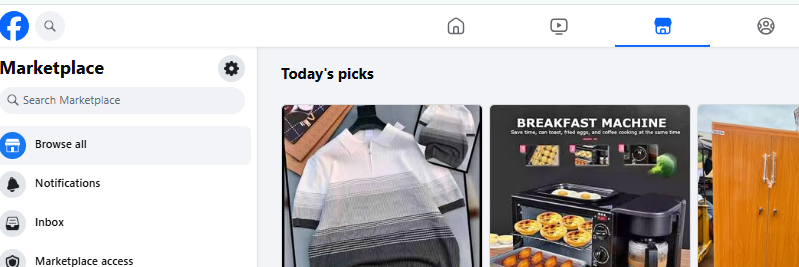
To begin, you must first navigate to the Marketplace section of Facebook. On a desktop or laptop computer, you will find the distinct Marketplace icon—which is typically a small storefront symbol—located on the left-hand side of your news feed. For users on the Facebook mobile app, the icon is conveniently placed in the main navigation bar, usually at the top or bottom of the screen, providing quick and easy access to the platform.
2. Creating a Professional Listing
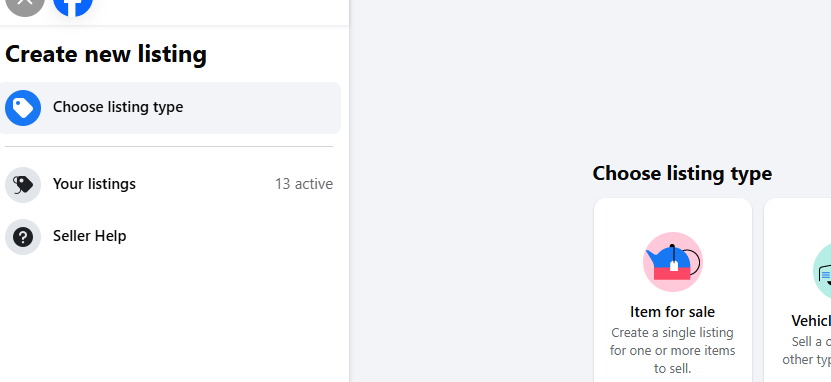
Once you have entered the Marketplace, your starting point is the “Create New Listing” button, which is prominently displayed. This action will present you with a series of options to select the type of item you are selling, such as “Item for Sale,” “Vehicle,” or “Housing for Rent.” Once you have made your selection, a comprehensive form will appear, guiding you through the process of providing all the necessary information about your product.
3. Adding Comprehensive and Compelling Item Details
This stage is absolutely paramount to the success of your listing. The more comprehensive and visually appealing your details, the higher your chances of a quick and profitable sale.
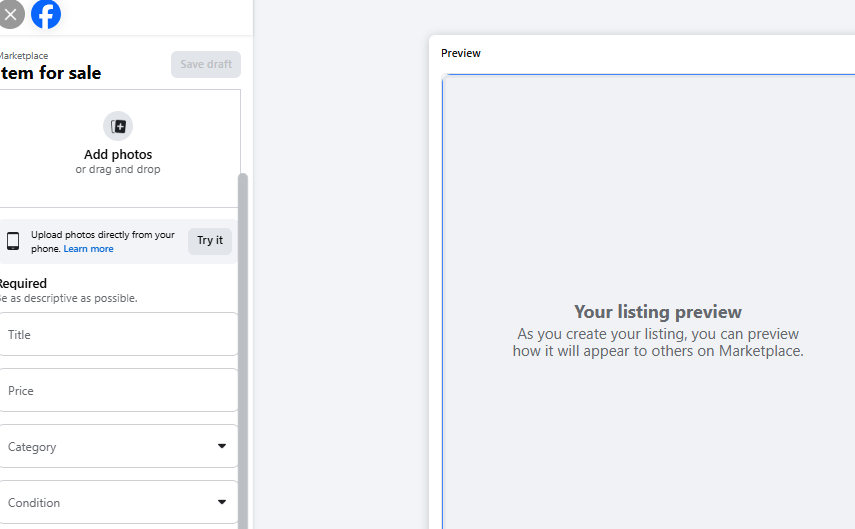
1. Item Title: Craft a clear, descriptive, and keyword-rich title. A title like “Antique Oak Wood Dining Table (Seats 6)” is far more effective and searchable than a generic “Table for sale.” Use specific details that a potential buyer might be searching for.
2. Price: Determine a competitive and fair price based on your market research. You have the flexibility to set a fixed price, but you can also mark the item as “Free” or indicate that the price is “Negotiable,” which can often encourage a larger number of offers and inquiries.
3. Be meticulous in selecting the most relevant category. This is crucial for ensuring that Facebook’s algorithm shows your listing to the right audience. An item in the wrong category may go unseen by the buyers who are most interested.
4. Condition: Provide an honest and accurate assessment of the item’s condition. The provided options (e.g., “New,” “Used – Like New,” “Used – Good,” “Used – Fair”) give buyers a clear understanding of what to expect. Honesty here is key to building and maintaining a good reputation.
5. Description: Write a detailed and compelling narrative about your item. Include all pertinent information such as dimensions, materials, brand, age, and a brief history of the item if it’s relevant. It is always wise to mention any minor flaws or imperfections upfront to manage buyer expectations and prevent issues down the line.
6. Photos: This is your opportunity to make a great first impression. Upload multiple high-resolution, well-lit photos from various angles. Showcase the item in its best light and consider including close-ups of any unique features, labels, or specific details you mentioned in the description. A visually appealing listing is far more likely to capture a buyer’s attention.
4. Specifying Location and Delivery Options
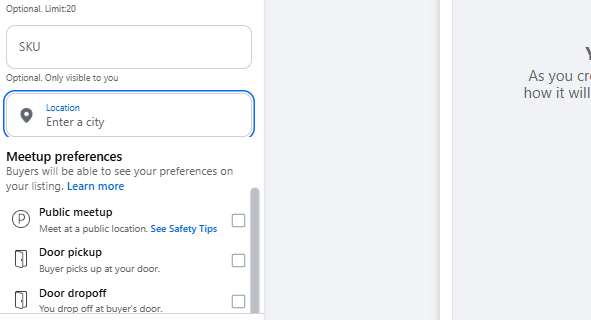
You have complete control over the geographic reach of your listing. You can set your precise location, and the Marketplace will prioritize showing your item to local buyers. Additionally, you can choose from various delivery options, including local pickup, local delivery, or shipping, which can dramatically expand your potential customer base beyond your immediate area.
5. Publishing and Managing Your Listing
With all the details in place, simply click the “Publish” button. Your listing will now be live on the Marketplace. As potential buyers begin to contact you, the conversations will arrive in your Facebook Messenger inbox.
It is absolutely essential to be prepared to respond quickly and professionally, as timely communication is a key factor in building a positive seller reputation. All your active listings can be managed from a central dashboard within the Marketplace, allowing you to easily edit information or mark an item as sold once the transaction is complete.
Related: Social Media as a Customer Service Tool: Tips & Examples
How Live Chat from Salesgroup AI Can Scale Your Marketplace Selling
As your business on Facebook Marketplace gains traction and the volume of customer inquiries grows, manually managing every conversation can quickly become a significant and time-consuming challenge.
This is where the strategic implementation of advanced customer engagement tools becomes not just a luxury, but a necessity. Integrating a sophisticated live chat solution is a game-changer for scaling your operations.
For example, a live chat platform from Salesgroup AI can be seamlessly integrated directly with your Facebook Messenger account. This powerful tool leverages artificial intelligence to automatically handle a significant portion of routine customer interactions.
For instance, the AI can be programmed to instantly answer frequently asked questions about product availability, shipping costs, payment methods, or return policies. This frees up a tremendous amount of your time that would otherwise be spent on repetitive tasks.
The AI can also be used to qualify potential leads by asking specific questions to gauge their interest, and for more complex issues, it can automatically create a support ticket and seamlessly hand off the conversation to you with a complete history of the interaction.
This ensures that every potential customer receives an immediate, professional, and consistent response, allowing you to focus your attention on high-value activities like sourcing new products, optimizing your listings, and closing sales.
Tips for Selling Massively on Facebook Marketplace
For businesses aiming to move beyond a few casual sales and truly scale their operations on Facebook Marketplace, a more strategic approach is required. Here are some key tips to help you sell massively and build a successful enterprise:
1. Optimize Your Photos for Click-Through:
Your images are the first thing a buyer sees. Invest in high-quality photos with excellent lighting and a clean, appealing background. Consider lifestyle shots that show the product in use, as well as detailed close-ups. A professional-looking photo gallery signals a trustworthy seller.
2. Master the Art of the SEO-Friendly Title:
The Facebook Marketplace search algorithm functions much like a search engine. Use keywords that your target audience would be searching for. Include the brand, model, size, color, and any unique features in the title to increase your listing’s visibility.
3. Cross-Post to Multiple Groups:
Don’t limit your reach to just the main Marketplace. After creating your listing, cross-post it to relevant local buying and selling groups, as well as niche groups (e.g., “Vintage Furniture Lovers”). This dramatically expands your audience and potential for sales.
4. Automate Your Communication:
As mentioned, a high volume of inquiries can be overwhelming. Set up quick, pre-written responses in Messenger for common questions. Better yet, integrate an AI-powered live chat solution like Salesgroup AI to handle initial inquiries, qualify leads, and provide instant support 24/7.
5. Bundle Products for Increased Value:
If you have multiple related items, consider bundling them together. This can create a more attractive offer for buyers and helps you move more inventory at once.
6. Offer Flexible Pricing and Delivery:
To attract a wider range of buyers, be open to negotiation and provide multiple options for delivery, from local pickup to shipping. This flexibility can be the deciding factor for many customers.
7. Actively Manage and Refresh Listings:
Listings can sometimes get buried over time. Actively manage your listings by periodically bumping them or relisting them to keep them at the top of search results. You can also edit and update the description or photos to keep them fresh.
8. Build a Seller Reputation:
Positive ratings and reviews are your greatest asset on Facebook Marketplace. Always be polite, professional, and transparent in your dealings. Prompt communication and accurate descriptions will lead to positive feedback, which in turn builds trust and attracts more buyers.
Conclusion
Facebook Marketplace offers an incredibly accessible and powerful way for business owners to connect with a vast network of buyers. Its intuitive interface and deep integration with Facebook’s social platform simplify communication and help build a foundation of trust.
However, as your sales and customer base grow, the manual management of a high volume of inquiries and conversations can become an overwhelming burden. This is precisely why the strategic adoption of a tool like Salesgroup AI Live Chat becomes a critical asset.
By automating routine conversations, providing instant and intelligent support, and streamlining your workflow, you can effectively scale your business without getting bogged down by administrative tasks. Ultimately, leveraging the right technology allows you to transform a high volume of inquiries into a steady and robust stream of sales, ensuring your continued success on the Marketplace for years to come.
