

Tawk.to Review: Features, Pros & Cons, Pricing 2026
Tawk.to is a free-to-use live chat application, and it is important to do a Tawk.to review because this tool has completely changed the game for how small and growing businesses handle customer service. When it comes to getting online, providing support used to be very expensive. Only large companies could afford the powerful software needed to talk to customers instantly on their website.
Tawk.to changed that by making its core features available for free, forever. In this very detailed article, we are going to dive deep into everything you need to know about Tawk.to: what the product is and its main mission, the key features that help your team work faster, a clear and honest look at its unique pricing model (and where the costs might be hidden), and finally, a conclusion on its overall value and role in the future of online business communication.
Our goal is to give you a clear, easy-to-understand look at how this platform can turn your customer support into a successful, cost-effective part of your business, helping you connect with millions of people. Let’s dive in.

What is Tawk.to?
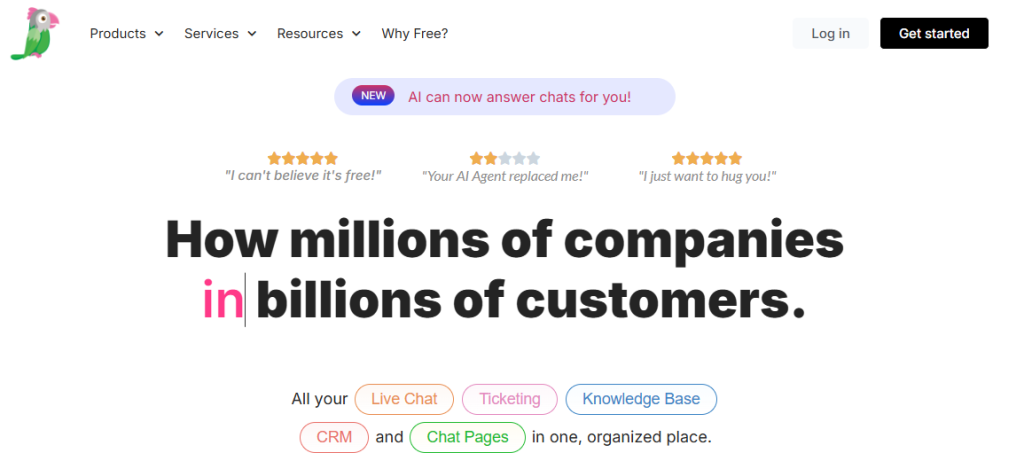
At its simplest, Tawk.to is a software company that offers its main product—a live chat application—to businesses for absolutely no cost. It is often known as the world’s most popular live chat solution, largely because of this “free forever” model. The software lets companies talk to visitors on their website in real-time, just like texting a friend.
Tawk.to’s main mission is straightforward: to allow businesses of any size, anywhere in the world, to monitor their website visitors and engage with them instantly, without the high price tag of traditional helpdesk software. It’s built on the belief that chatting with your customers should not be something you have to pay for, because the visitors on your website are already yours.
The Core Function: Monitoring and Engaging
When you install the small piece of code on your website, Tawk.to starts working immediately. It gives your support team a dashboard, which acts as their command center. Here, the two core functions happen seamlessly:
1. Visitor Monitoring:
The software shows your agents a live stream of every visitor on your website. They can see what page the visitor is on right now, where they came from (like Google or a social media ad), and even how many times they have visited your site before. This real-time visibility means your team is never blind; they are always ready.
2. Live Chat Communication:
This is the main service. The platform provides a small, customizable chat widget that sits on your website. Customers can click it to ask a question. Agents can manage many chats at once from their dashboard, keeping communication fast and personal.
The key here is the unlimited nature: Tawk.to does not charge you based on how many people chat with you or how many times you chat with them. You can have endless chats, which is a massive benefit for high-traffic websites.
Related: HappyFox Review: Features, Pricing, Pros & Cons 2026
Key Features That Make Tawk.to Essential
The popularity of Tawk.to isn’t just about the price; it’s about the fact that the free product is packed with high-quality features. Many tools that competitors charge for are simply built into Tawk.to’s core free offering. These features are designed to increase efficiency for the agent and reduce friction for the customer.
1. Live Engagement and Proactive Support
These features focus on moving from passive support (waiting for the customer to ask for help) to active engagement (reaching out to help them).
Real-Time Visitor Monitoring
This is one of the most powerful free tools Tawk.to offers. Your agent dashboard displays an up-to-the-second view of every visitor. This includes:
- Location: Knowing the country or even the city of the visitor.
- Current Page: Seeing exactly what product page or help article they are looking at.
- History: Viewing how many times they have been to your site and their past chat transcripts.
This data allows for proactive chat, where an agent can initiate a conversation with a visitor who might look stuck—for example, a visitor who has been on the pricing page for five minutes. The agent can jump in and offer specific help, which is a known strategy for increasing sales conversion rates and preventing abandoned shopping carts.
Chat Triggers and Automated Messaging
To make proactive chat scalable, you can set up automated Triggers. These are rules that launch a chat message without human intervention. Common triggers include:
- “If a visitor lands on the ‘Returns Policy’ page, wait 30 seconds, then send a message: ‘Hi! Can I help clarify anything about our return process?'”
- “If a visitor is inactive for 60 seconds after adding an item to the cart, send a message: ‘Looks like you might be having trouble checking out. I’m here to help!'”
This automation ensures your team only talks to the customers who need the most help, while still providing instant, relevant assistance to everyone else.
2. The Full Service Suite
Tawk.to realized that chat is often only the start of the support process. They built an entire basic helpdesk around the chat function, which is all included for free.
Integrated Ticketing System
When a customer reaches out outside of business hours or via email, the issue needs to be tracked. Tawk.to includes a Ticketing System that does two key things:
- Offline Capture: If no agent is online, the chat widget automatically turns into a contact form, and the inquiry becomes a support ticket, guaranteeing nothing is lost.
- Email Conversion: You can forward your support email address (like
support@yourcompany.com) directly to Tawk.to. The platform automatically converts every incoming email into a trackable ticket, which can be assigned, tagged, and solved, just like a chat. This centralizes support communication, which is the main goal of any helpdesk software.
Free Knowledge Base (KB)
For self-service, Tawk.to gives you a completely free, customizable platform to build your own Knowledge Base or Help Center.
- Easy Creation: It uses a simple, block-based editor, making it easy to create articles with images, videos, and code snippets without needing any design skills.
- Internal and External Use: You can use the Knowledge Base publicly, letting customers find their own answers (which reduces the number of incoming chats and tickets), and you can use it internally, allowing agents to quickly find the correct company policy or solution steps during a live chat. This instant access to information speeds up resolution time.
Tawk.to Contacts (Free CRM)
Every customer who chats with you is automatically saved as a contact in Tawk.to’s basic built-in CRM (Customer Relationship Management) tool, called Contacts. This creates a history for every visitor, logging their name, email (if provided), location, and every past conversation they have had with your team. This history ensures that when a customer chats again, your agent has the full context and doesn’t have to ask, “Can you explain your problem again?”
3. Agent Tools and Collaboration
A good support platform must help your team work together. Tawk.to includes features that allow for seamless team effort, even when agents are working remotely.
Unlimited Agents: Crucially, Tawk.to does not limit the number of agents you can add to your account. You can have 1 agent or 1,000 agents, and the core software remains free. This is the single biggest difference from most competitors.
Agent-to-Agent Messaging: Agents can message each other privately inside the platform to ask for help on a complex ticket without the customer seeing the conversation. This peer-to-peer collaboration is key for remote teams.
Mobile and Desktop Apps: Tawk.to provides free, full-featured apps for iOS, Android, macOS, and Windows. This means agents can answer chats and tickets on the go, ensuring that support is never tied to a desk and that service can truly be 24/7 if your team is flexible.
The Pricing of Tawk.to
The biggest question about Tawk.to is always: “If it’s free, how do they make money?” Understanding this is key to evaluating the software’s true long-term cost for your business. The core answer is that Tawk.to monetizes through optional add-ons and hired services, not through limiting the basic functionality you need to operate a functional help desk.
The Truly Free Core (Unlimited & Forever)
The following core services are genuinely free, with no usage limits, no agent limits, and no time limits:
- Live Chat: Unlimited chats, unlimited websites (properties), and unlimited history.
- Ticketing: Unlimited tickets created from email and the offline form.
- Knowledge Base: Unlimited articles and customizable public portal.
- Basic Reports: Analytics on chat volume, agent activity, and visitor tracking.
This model is transformative for startups and small businesses because it removes the massive initial cost barrier of getting professional support software.
The Revenue Model: Paid Add-ons and Services
Tawk.to makes its money by offering services and features that larger or more professional companies often want, but which are not strictly necessary for basic functionality. These are always clearly marked as optional purchases.
1. Remove Branding ($29 per Month, Billed Annually)
The most common paid add-on is for Branding Removal. By default, the chat widget, the chat transcripts sent to customers, and the knowledge base URL will include a small “Powered by tawk.to” tag. For many professional or larger companies, this needs to be removed to maintain a clean, branded customer experience.
Tawk.to charges a fee per site (called a “property”) to remove this small brand mention, which is a predictable monthly revenue stream for them.
2. AI Assist (Usage-Based Pricing)
Tawk.to has recently introduced AI Assist to compete with modern AI-powered tools. This is the new optional brain for the software, offering features like:
- AI Agents: Automated bots that can hold complex conversations and answer questions based on your unique knowledge base.
- Smart Replies: Suggestions given to your human agents to help them respond faster.
- Automated Translation: Real-time chat translation.
Unlike the core free product, AI Assist is a paid add-on that uses a usage-based pricing model. You pay for a block of AI-handled messages per month. If you exceed that limit, you purchase extra message credits. This is a pay-for-what-you-use model that is very different from the free core, and it is where the price starts to climb if you decide to heavily automate your support.
3. Video + Voice + Screensharing ($29 per Month, Billed Annually)
For businesses that need higher-touch technical support or sales demos, Tawk.to offers an add-on for Video, Voice, and Screensharing right inside the chat window. This means an agent can instantly jump into a call or share their screen with a customer to solve a problem visually, all without the customer having to download any new software. This premium feature is considered a valuable upsell that many service and tech companies are willing to pay a flat monthly fee for.
4. Hired Agents (Starts at $1 per Hour)
This is Tawk.to’s most unique revenue source: they offer to staff your chat for you. If you are a small business owner who doesn’t have the time to answer chats 24/7, Tawk.to can hire, train, and manage dedicated, outsourced support agents for you.
This service is billed hourly and is customizable based on your coverage needs (e.g., 24/7 coverage, only weekends, or full-time during business hours). This transforms Tawk.to from a software provider into a full-service staffing company, allowing them to generate significant revenue while maintaining the core software’s free status.
The Core Impact of Tawk.to on Businesses
The widespread use and feature set of Tawk.to have had a major impact on the customer service industry, particularly for new and growing companies.
1. Removing the Barrier to Entry
Before Tawk.to, companies were forced to choose between expensive, professional software or slow, unprofessional email support. Tawk.to fixed this by offering a zero-cost, high-quality solution.
This allows a solo entrepreneur, a side project, or a non-profit organization to use the same quality of live chat tool as a multinational corporation. This huge lowering of the barrier to entry has allowed millions of small businesses to start building customer relationships through instant messaging immediately, right from day one.
2. Rapid Scalability
The fact that Tawk.to offers unlimited agents and unlimited chat volume means that a startup never has to worry about its software cost suddenly jumping when a new marketing campaign succeeds and chat volume explodes. The core operating cost remains zero.
This gives growing teams predictable expenses and lets them focus their limited budget on hiring better people or improving their product, rather than paying for software seats. This is a massive de-risking factor for young companies that need to grow quickly without financial surprises.
3. The Data and Context Advantage
The real-time visitor monitoring feature gives agents powerful context, which helps turn support into sales. When an agent sees a visitor lingering on a high-value product page, they are equipped to send a highly relevant, proactive message that can directly lead to a sale.
Tawk.to’s free platform shifts customer service from a purely reactive cost center (just answering questions) to a proactive revenue generator (helping customers buy). The ability to track visitor movements and past chats all for free makes this powerful context available to everyone, democratizing smart customer engagement.
The Salesgroup Alternative
While Tawk.to is a powerful, chat-centric helpdesk, some businesses need a tool that focuses more on managing the entire customer relationship, which includes sales and marketing data, not just service. This is where a larger, all-in-one Customer Relationship Management (CRM) platform, often referred to as a Salesgroup platform, becomes a necessary alternative.
Tawk.to is built to manage communication and problems. A Salesgroup platform is built to manage the customer’s entire lifecycle.
Why a Salesgroup Platform is Different
- Unified Data: A Salesgroup platform links service tickets directly to sales pipelines and marketing campaign data.
This means that when an agent in a Salesgroup platform looks at a chat, they don’t just see the history of that customer’s support issues; they also see the last product they bought, the last email promotion they received, and the current value of their sales contract. - Cross-Department Automation: In a Salesgroup platform, you can create automation that affects the whole company. For example: “If a new visitor starts a chat and asks about a price, immediately create a new sales lead in the sales team’s pipeline.”
This kind of deep, automated connection between support and sales is often more complex to achieve with Tawk.to, which is primarily focused on the chat and ticket management side of the house. - Advanced Reporting: Salesgroup platforms usually offer much deeper reporting tools that combine revenue metrics (how much the customer has spent) with support metrics (how happy they are). This gives high-level managers a complete business intelligence view.
Choosing a Salesgroup alternative over Tawk.to means trading Tawk.to’s simplicity and free core product for the deep, full-business integration and complexity of a large, expensive CRM system.
If your core need is simply great, free, and scalable customer service communication, Tawk.to is the right answer. If your core need is linking service directly to sales commissions and marketing ROI, a powerful Salesgroup platform might be the way to go.
Conclusion
For any business just starting out or working on a tight budget, Tawk.to provides the best value and feature set on the market, offering incredible scalability with zero cost risk. The free core product is genuinely rich and usable.
The future of customer service is defined by being instant, accessible, and smart. Tawk.to ensures that every company can be instant and accessible. By offering powerful tools like AI Assist as an optional add-on, Tawk.to also lets businesses add the “smart” layer of automation when they are ready to invest, rather than forcing them to pay for it from the start. This flexible approach makes Tawk.to a dominant and reliable tool for the next generation.
