

How to Use AI to Write Effective Job Descriptions
In today’s competitive job market, attracting top talent starts with a compelling job description. However, crafting the perfect job posting can be time-consuming and challenging. This is where AI tools like WordWriter come in, revolutionizing how we create job descriptions. Let’s explore how you can leverage this technology to streamline your recruitment process.
Why Traditional Job Description Writing is Challenging
Writing effective job descriptions has always been a pain point for HR professionals and hiring managers. The process is typically:
- Time-consuming, especially when creating multiple listings
- Difficult to balance being comprehensive while remaining concise
- Challenging to maintain consistency across different roles
- Prone to unconscious bias in language and requirements
- Often results in generic content that fails to attract ideal candidates
Introducing WordWriter: Your AI Solution for Job Descriptions
WordWriter is an advanced AI content generation platform that helps you create professional job descriptions in minutes. The tool offers a dedicated “Job Description” feature that uses sophisticated natural language processing to generate tailored job postings that are both appealing to candidates and optimized for search engines.
Step-by-Step Guide to Using WordWriter for Job Descriptions
1. Access the Job Description Feature
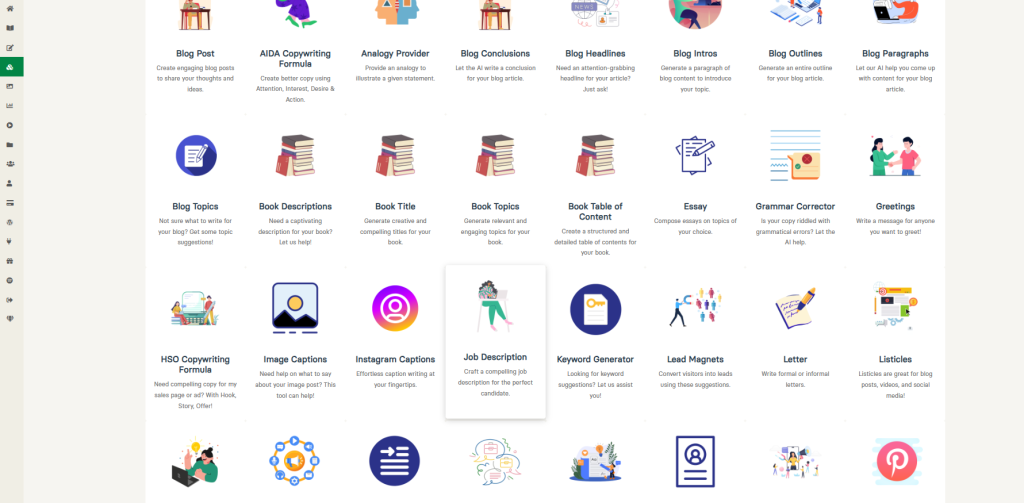
From WordWriter’s dashboard, locate and select the “Job Description” option from the available content types. This is specifically designed to craft compelling job listings that highlight roles and responsibilities effectively.
2. Choose Your Starting Point
WordWriter offers flexibility in how you approach your job description:
- Select “From Scratch” to create an entirely new job description
- Or upload existing content to refine and enhance a current job posting
3. Provide Context and Instructions
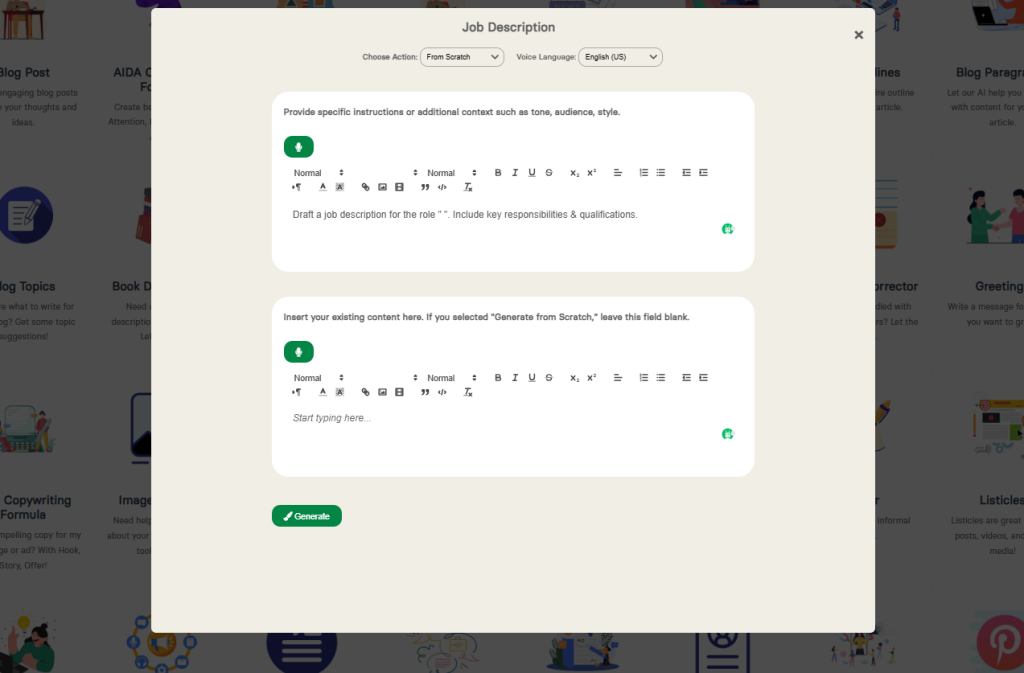
For optimal results, provide specific instructions regarding:
- The role title and department
- Tone (formal, conversational, enthusiastic)
- Target audience (entry-level graduates, experienced professionals, etc.)
- Style preferences (concise, detailed, creative)
- Industry-specific terminology to include
4. Add Role Information
Include key details about:
- Primary responsibilities
- Required qualifications and skills
- Preferred experience levels
- Reporting structure
- Location or remote work options
5. Generate and Refine
Click “Generate” and within seconds, WordWriter will create a comprehensive job description based on your inputs. The AI-generated content serves as an excellent starting point that you can then review and refine to ensure it perfectly matches your company’s voice and the specific role requirements.
Best Practices for AI-Generated Job Descriptions
Be Specific with Your Instructions
The more context you provide, the better the output. Include details about your company culture, specific technical skills required, and any unique aspects of the role.
Review for Accuracy and Relevance
While AI is powerful, human oversight remains crucial. Review all generated content to ensure accuracy and relevance to the specific position.
Ensure Inclusive Language
Check that the language is inclusive and free from bias. AI tools like WordWriter are designed to avoid biased language, but a human review is still recommended.
Optimize for Search
Include relevant keywords that job seekers might use when searching for positions like yours. WordWriter helps with this, but consider adding industry-specific terms that candidates in your field would be searching for.
Benefits of Using AI for Job Description Writing
Time Efficiency
What might take hours to draft manually can be accomplished in minutes with AI assistance, allowing you to focus on other aspects of the recruitment process.
Consistency Across Listings
AI ensures that all your job descriptions maintain a consistent tone and structure, reinforcing your employer brand.
Improved Candidate Targeting
Well-crafted job descriptions attract more qualified candidates and reduce the number of unsuitable applications, saving you time during the screening process.
Reduction in Unconscious Bias
AI tools like WordWriter are designed to use neutral language, helping to reduce unconscious bias that might discourage diverse candidates from applying.
Limitations and Considerations
While AI tools like WordWriter are powerful, they work best when viewed as collaborative assistants rather than complete replacements for human judgment. Always:
- Review AI-generated content for accuracy and alignment with your company values
- Ensure legal compliance with employment laws in your jurisdiction
- Add a personal touch that reflects your unique company culture
Conclusion
AI-powered tools like WordWriter are transforming the job description writing process, making it faster, more consistent, and more effective. By following the steps outlined in this guide, you can create compelling job descriptions that attract top talent while saving valuable time and resources.
Ready to revolutionize your recruitment process? Give WordWriter a try for your next job posting and experience the power of AI-assisted job description creation.
