

How to Add SalesGroup AI Push Notifications to Your Website
SalesGroup AI Push Notifications allow you to re-engage your visitors and convert them into loyal customers with minimal effort. Follow these steps to integrate push notifications on your website and start leveraging their power.

Step 1: Navigating to the Web Push Section
- Log in to your SalesGroup AI dashboard.
- Navigate to the Push Notification section. Once there, you will see the Web Push & Broadcast Studio interface, as shown in the screenshot.
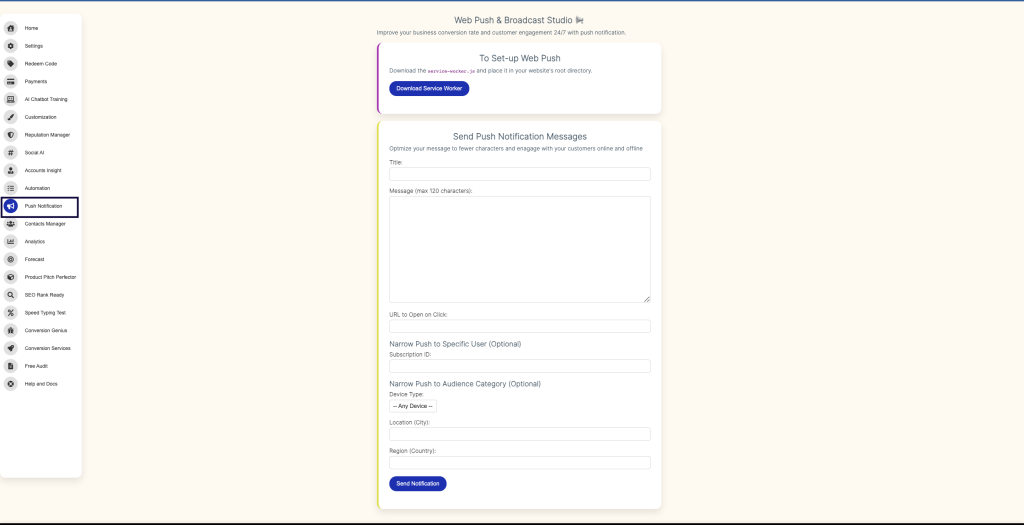
Step 2: Download the Service Worker File
To enable push notifications, you’ll need to integrate the necessary files into your website.
- In the Web Push & Broadcast Studio section, click the Download Service Worker button to download the
service-worker.jsfile. - Upload the
service-worker.jsfile to your website’s root directory via your FTP client or hosting provider. This is essential for enabling the push notifications feature.
Related: How to Use SalesGroup AI Reputation Management System
Step 3: Customize Your Push Notification Messages
Once the file has been uploaded, it’s time to start sending out notifications:
Under Send Push Notification Messages, you’ll have options to:
- Title: Craft an attention-grabbing title.
- Message: Write a short, impactful message (limited to 120 characters).
- URL to Open on Click: Set a URL that users will be directed to when they click the notification.
Related: Jaci – AI Chatbot
Step 4: Target Specific Audiences (Optional)
You can narrow your push notifications to specific audiences for maximum effectiveness:
- Narrow Push to Specific User: Enter the Subscription ID to target specific users.
- Narrow Push to Audience Category: Filter users by device type or location (city or country) to deliver personalized notifications.
Step 5: Send Your Notification
Once your message is ready, click the Send Notification button to broadcast it to your audience.
Why Use SalesGroup.ai Push Notifications?
SalesGroup.ai’s push notifications offer significant advantages, as highlighted in the screenshot:
- 4x More Conversion Power than Email: Push notifications can drive much higher engagement compared to email, with an 8-10% click-through rate.
- Boost Ad ROI: Turn your site visitors into paying customers without increasing ad spend. Push notifications help you make every click count by engaging users after they’ve left your site.
By following these steps, you can integrate SalesGroup.ai push notifications into your website and begin seeing increased engagement and conversions!
