

Chatbot Persona: What it is + How to Create One
Chatbots have become indispensable tools for businesses, particularly in the realm of sales and customer service. A well-crafted chatbot persona can significantly enhance user engagement, build trust, and drive conversions.
For a company, creating a chatbot persona that aligns with its brand values and customer expectations is crucial. This article delves into the intricacies of crafting a chatbot persona, offering a detailed guide to help SalesGroup AI and similar businesses develop a chatbot that resonates with their audience.
What is a Chatbot Persona?
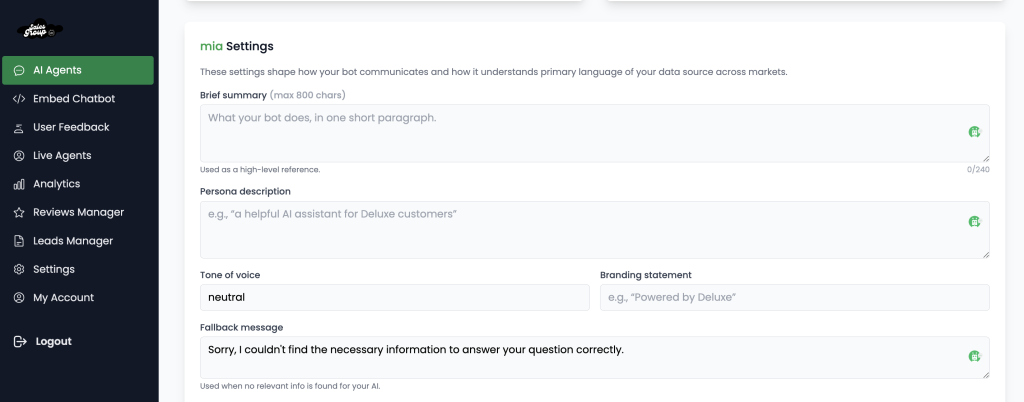
A Chatbot Persona is the personality, tone, and character traits assigned to a chatbot to make interactions feel more human-like and engaging. It defines how the chatbot communicates, responds to queries, and represents a brand’s voice.
For example, a finance chatbot might have a formal and professional persona, while an e-commerce chatbot could be more friendly and playful. Don’t know what name to give your chatbot? read our article on how to name a chatbot for further clarity.
Understanding the Importance of a Chatbot Persona
Before diving into the creation process, it’s essential to understand why a chatbot persona matters. A chatbot persona is the personality and tone of voice that a chatbot adopts during interactions with users. It encompasses the chatbot’s language style, tone, and even its “character” traits. A well-defined persona can:
- Enhance User Experience: A relatable and engaging persona makes interactions more enjoyable and less robotic.
- Build Trust: A consistent and professional persona can establish credibility and trust with users.
- Drive Engagement: A persona that aligns with the brand can encourage users to interact more frequently and for longer durations.
- Improve Conversion Rates: A persuasive and empathetic persona can guide users through the sales funnel more effectively.
Related: Chatbot Pricing: How Much does a Chatbot Cost
Step by Step Guide on How to craft a Chatbot persona
1. Define Your Objectives
The first step in crafting a chatbot persona is to define the objectives of the chatbot. The primary objectives might include:
- Lead Generation: The chatbot should be able to capture leads by engaging users in meaningful conversations.
- Customer Support: The chatbot should provide quick and accurate responses to customer inquiries.
- Sales Assistance: The chatbot should assist in the sales process by recommending products, answering questions, and guiding users through the purchase process.
- Brand Representation: The chatbot should embody the values and personality of SalesGroup AI, reinforcing the brand’s identity.
Understanding these objectives will guide the development of the chatbot persona, ensuring that it aligns with the company’s goals.
2. Know Your Audience
A successful chatbot persona is one that resonates with its target audience. The audience likely includes:
- Sales Professionals: Individuals or teams looking for AI-driven solutions to enhance their sales processes.
- Business Owners: Entrepreneurs seeking tools to improve their sales performance.
- Marketing Teams: Professionals interested in integrating AI into their marketing strategies.
Understanding the demographics, preferences, and pain points of these groups is crucial. For instance, sales professionals might appreciate a chatbot that is direct, data-driven, and efficient, while business owners might prefer a more conversational and empathetic tone.
3. Define the Chatbot’s Personality
Once the objectives and audience are clear, the next step is to define the chatbot’s personality. This involves deciding on the chatbot’s tone, language style, and character traits. Here are some key considerations:
a. Tone
The tone of the chatbot should align with the brand’s voice and the preferences of the target audience. The tone could be:
- Professional: Reflecting the company’s expertise in AI and sales.
- Friendly: Making users feel comfortable and valued.
- Empathetic: Understanding and addressing user concerns with care.
- Persuasive: Encouraging users to take desired actions, such as signing up for a demo or making a purchase.
b. Language Style
The language style should be consistent with the brand’s communication strategy. The chatbot could use:
- Clear and Concise Language: Avoiding jargon and ensuring that messages are easily understood.
- Positive Language: Using affirmative and encouraging phrases to create a positive user experience.
- Action-Oriented Language: Prompting users to take specific actions, such as “Click here to learn more” or “Schedule a demo today.”
c. Character Traits
The chatbot’s character traits should reflect the brand’s values and appeal to the target audience. The chatbot could embody traits such as:
- Knowledgeable: Demonstrating expertise in AI and sales.
- Helpful: Always ready to assist users with their queries.
- Proactive: Anticipating user needs and offering solutions before they are explicitly requested.
- Reliable: Providing accurate and consistent information.
4. Create a Persona Profile
To bring the chatbot persona to life, it’s helpful to create a detailed persona profile. This profile serves as a reference point for all interactions and ensures consistency across different channels. A persona profile for SalesGroup AI’s chatbot might include:
a. Name
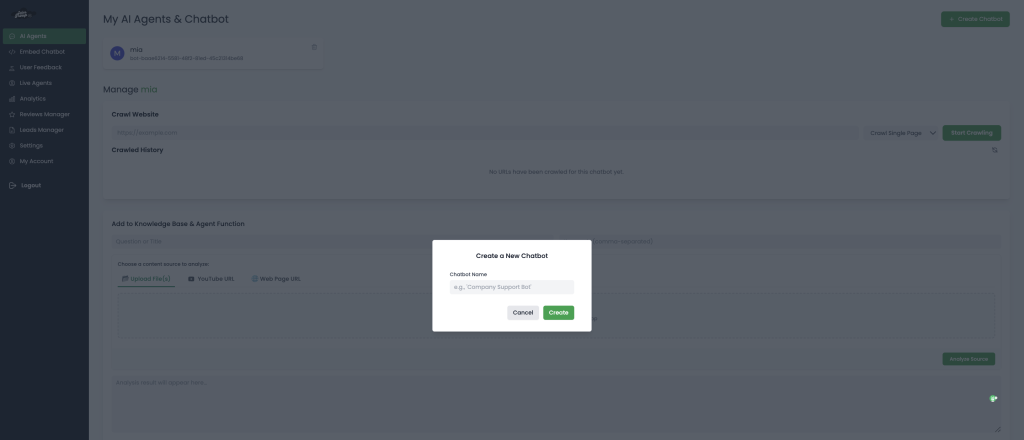
Choose a name that reflects the brand and is easy for users to remember. For example, “SalesBot” or “Ava” (short for AI Virtual Assistant).
b. Background
Provide a brief background story for the chatbot. This could include its “role” within the company, its “experience,” and its “mission.” For example:
“SalesBot is an AI-powered virtual assistant developed by SalesGroup AI. With years of experience in the sales industry, SalesBot is dedicated to helping businesses optimize their sales processes and achieve their goals. Its mission is to provide users with quick, accurate, and personalized assistance, making sales easier and more efficient.”
c. Visual Representation
While not always necessary, a visual representation of the chatbot can enhance user engagement. This could be an avatar or an icon that appears during interactions. The visual design should align with the brand’s aesthetics and the chatbot’s personality.
d. Key Phrases and Responses
Develop a set of key phrases and responses that the chatbot will use frequently. These should reflect the chatbot’s tone and personality. For example:
- Greeting: “Hi there! I’m SalesBot, your AI sales assistant. How can I help you today?”
- Assistance: “I’m here to help you with any questions you have about our products or services. Just let me know!”
- Closing: “Thanks for chatting with me! If you have any more questions, feel free to reach out. Have a great day!”
e. Interaction Guidelines
Establish guidelines for how the chatbot should interact with users. This includes:
- Response Time: Aim for quick responses to keep users engaged.
- Error Handling: Provide clear and helpful messages when the chatbot encounters an error or doesn’t understand a query.
- Personalization: Use the user’s name and reference previous interactions to create a personalized experience.
5. Develop the Chatbot’s Dialogue Flow
The dialogue flow is the structure of the conversation between the chatbot and the user. It determines how the chatbot responds to different inputs and guides the user through the interaction. For SalesGroup AI, the dialogue flow should be designed to achieve the chatbot’s objectives, whether that’s generating leads, providing support, or assisting with sales.
Key Components of Dialogue Flow
- Greeting: The chatbot should start with a friendly greeting to set the tone for the conversation.
- Introduction: Briefly introduce the chatbot and its capabilities.
- User Input: Allow the user to ask questions or provide information.
- Response: The chatbot should respond appropriately based on the user’s input.
- Follow-Up: If necessary, the chatbot should ask follow-up questions to gather more information or guide the user further.
- Closing: End the conversation on a positive note, encouraging the user to return if they have more questions.
Example Dialogue Flow
User: Hi, I’m interested in learning more about SalesGroup AI’s products.
SalesBot: Hi there! I’m SalesBot, your AI sales assistant. We offer a range of AI-driven solutions to help businesses optimize their sales processes. Are you looking for something specific, or would you like a general overview?
User: I’d like a general overview.
SalesBot: Great! Our products include AI-powered sales forecasting, lead scoring, and customer engagement tools. These solutions are designed to help businesses increase efficiency, improve accuracy, and drive revenue growth. Would you like to learn more about any of these features?
User: Yes, tell me more about lead scoring.
SalesBot: Sure! Our lead scoring tool uses advanced AI algorithms to analyze customer data and assign scores to leads based on their likelihood to convert. This helps sales teams prioritize their efforts and focus on the most promising leads. Would you like to see a demo or schedule a consultation?
User: A demo would be great.
SalesBot: Fantastic! I can arrange a demo for you. Could you please provide your email address so we can send you the details?
User: Sure, it’s john.doe@example.com.
SalesBot: Thanks, John! We’ll send you an email with the demo details shortly. If you have any more questions in the meantime, feel free to ask. Have a great day!
6. Implement Natural Language Processing (NLP)
Natural Language Processing (NLP) is a critical component of any chatbot, enabling it to understand and respond to user inputs in a human-like manner. For SalesGroup AI, implementing advanced NLP capabilities will ensure that the chatbot can handle a wide range of queries and provide accurate, context-aware responses.
Key NLP Features
- Intent Recognition: The chatbot should be able to identify the user’s intent behind a query. For example, if a user asks, “How does lead scoring work?” the chatbot should recognize that the user is seeking information about lead scoring.
- Entity Recognition: The chatbot should be able to extract specific pieces of information from user inputs, such as names, dates, or product names.
- Context Management: The chatbot should maintain context across multiple turns in a conversation, allowing it to provide coherent and relevant responses.
- Sentiment Analysis: The chatbot should be able to detect the user’s sentiment (positive, negative, neutral) and adjust its responses accordingly.
Example of NLP in Action
User: I’m frustrated with my current sales tools. They’re not helping me close deals.
SalesBot: I’m sorry to hear that you’re feeling frustrated. Our AI-driven sales tools are designed to help you close deals more efficiently. Would you like to learn more about how we can assist you?
In this example, the chatbot uses sentiment analysis to detect the user’s frustration and responds with empathy, offering a solution.
7. Test and Iterate
Once the chatbot persona and dialogue flow are developed, it’s essential to test the chatbot thoroughly before deployment. Testing helps identify any issues or areas for improvement, ensuring that the chatbot provides a seamless user experience.
Types of Testing
- Functional Testing: Ensure that the chatbot works as intended, with all features and responses functioning correctly.
- User Testing: Conduct user testing with a sample of the target audience to gather feedback on the chatbot’s performance and persona.
- A/B Testing: Test different versions of the chatbot persona or dialogue flow to determine which one resonates best with users.
Iterative Improvement
Based on the feedback and testing results, make necessary adjustments to the chatbot persona and dialogue flow. Continuous iteration is key to refining the chatbot and ensuring that it meets user expectations.
8. Monitor and Optimize
After deployment, ongoing monitoring and optimization are crucial to maintaining the chatbot’s effectiveness. Use analytics tools to track key metrics such as user engagement, response accuracy, and conversion rates. Based on the data, make further adjustments to the chatbot persona and dialogue flow to enhance performance.
Key Metrics to Monitor
- Engagement Rate: Measure how often users interact with the chatbot and the duration of these interactions.
- Response Accuracy: Track the accuracy of the chatbot’s responses to ensure it provides helpful and relevant information.
- Conversion Rate: Monitor the number of users who take desired actions, such as signing up for a demo or making a purchase, after interacting with the chatbot.
- User Satisfaction: Collect user feedback to gauge satisfaction with the chatbot’s performance and persona.
Optimization Strategies
- Update Content: Regularly update the chatbot’s knowledge base to ensure it provides accurate and up-to-date information.
- Refine Dialogue Flow: Based on user interactions, refine the dialogue flow to improve the chatbot’s ability to guide users through the sales process.
- Enhance NLP Capabilities: Continuously improve the chatbot’s NLP capabilities to handle a wider range of queries and provide more context-aware responses.
Conclusion
Crafting a chatbot persona is a multifaceted process that requires careful consideration of the company’s objectives, target audience, and brand values. By defining a clear persona, developing a structured dialogue flow, and leveraging advanced NLP capabilities, You can create a chatbot that not only enhances user engagement but also drives sales and builds trust with customers.
The key to success lies in continuous testing, monitoring, and optimization, ensuring that the chatbot evolves to meet the changing needs of its users. With a well-crafted chatbot persona,
A chatbot with a compelling persona is not just a tool—it’s a strategic asset that can transform the way businesses interact with their customers.
