

How to Create a Chatbot Design [11 Simple Tip]
At Salesgroup, we understand the importance of delivering exceptional customer experiences. That’s why we’ve developed Chatbot, our AI-powered chatbot platform designed to help businesses automate customer interactions, streamline operations, and drive engagement. But having the right tools is only half the battle creating a well-designed chatbot is key to unlocking its full potential. In this guide, we’ll walk you through the steps to create a chatbot design that delivers results using Salesgroup’s Chatbot platform.
Related: Live chat Icons: [Examples & How to Customize]
How to Design a Chatbot
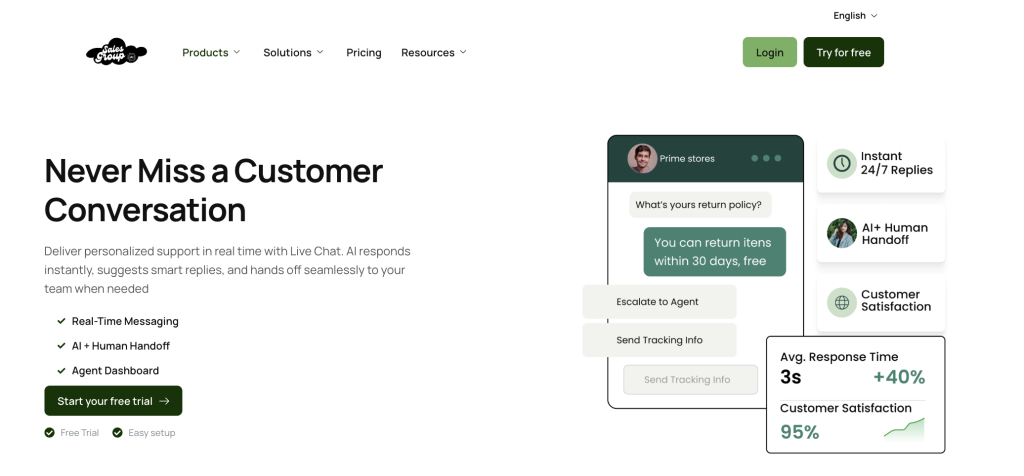
1. Define the Purpose and Scope of Your Chatbot
Before diving into design, clarify the role your chatbot will play. Ask yourself:
- What tasks will the chatbot handle? (e.g., answering FAQs, qualifying leads, processing orders)
- Who is the target audience? (e.g., customers, prospects, or internal teams)
- What are your success metrics? (e.g., response time, customer satisfaction, lead conversion)
With Salesgroup’s Chatbot platform, you can create chatbots for various use cases, from sales support to customer service. Defining the scope ensures your chatbot stays focused and effective.
2. Understand Your Users
A great chatbot design starts with understanding your users. Use Salesgroup’s Chatbot analytics to:
- Identify common customer pain points.
- Analyze frequently asked questions.
- Determine preferred communication styles (e.g., formal vs. casual tone).
This data will help you tailor your chatbot’s responses and ensure it resonates with your audience.
3. Design Conversational Flows
The key to a successful chatbot is natural, intuitive conversations. Here’s how to design effective flows using SALESGROUP’s Chatbot platform:
- Start with a Friendly Greeting: Use a warm, personalized greeting to set the tone.
- Keep It Simple: Avoid jargon and use clear, concise language.
- Offer Guided Options: Use buttons or quick replies to make interactions effortless.
- Handle Errors Gracefully: If the chatbot doesn’t understand a query, provide helpful suggestions or escalate to a human agent.
SALESGROUP’s Chatbot platform allows you to create branching logic for complex conversations, ensuring your chatbot can handle a variety of scenarios.
Related: Chatbot types: [Classification & Categories]
4. Leverage Salesgroup Advanced Features
Our Chatbot platform is packed with powerful features to enhance your chatbot’s performance:
- Natural Language Processing (NLP): Understand user intent and provide accurate, context-aware responses.
- Sentiment Analysis: Detect customer emotions and adjust responses accordingly (e.g., offer empathy for frustrated users).
- Machine Learning: Continuously improve your chatbot by learning from past interactions.
These features ensure your chatbot delivers a seamless and intelligent experience.
5. Personalize the Experience
Personalization is key to engaging users. With Salesgroup’s Chatbot platform, you can:
- Access customer data (e.g., purchase history, preferences) to provide tailored recommendations.
- Address users by name and reference past interactions.
- Offer proactive support based on user behavior (e.g., “We noticed you left items in your cart. Need help completing your purchase?”).
6. Test and Iterate
Before launching your chatbot, conduct thorough testing:
- Simulate real user interactions to identify gaps in the conversational flow.
- Gather feedback from beta testers to refine the design.
- Monitor performance metrics and make adjustments as needed.
Salesgroup’s Chatbot platform provides an analytics dashboard to track key metrics like response accuracy, user satisfaction, and resolution rates. Use this data to continuously optimize your chatbot.
7. Implement A/B Testing and Keep Refining
A/B testing is a powerful way to optimize your chatbot’s performance. Use SALESGROUP’s Chatbot platform to:
- Test different messaging styles, tones, and call-to-action buttons.
- Evaluate the effectiveness of response options (e.g., buttons vs. free text).
- Analyze user behavior to determine which version performs better.
Continuously refine your chatbot based on the insights gained from A/B testing. This iterative approach ensures your chatbot evolves to meet user needs and business goals.
8. Ensure Seamless Handoffs to Human Agents
While chatbots can handle many tasks, there will be times when human intervention is necessary. Salesgroup’s Chatbot platform allows you to:
- Recognize when a query is too complex and escalate it to a live agent.
- Provide a smooth transition by sharing the conversation history with the agent.
- Inform the user about the handoff and set clear expectations (e.g., “Let me connect you with a specialist who can assist you further.”).
9. Keep It Visually Appealing
A well-designed chatbot isn’t just functional, it’s also visually engaging. With SALESGROUP’s Chatbot platform, you can:
- Customize the chatbot’s interface to align with your brand identity.
- Incorporate visuals like images, GIFs, or videos to enhance interactions.
- Ensure the chatbot is mobile-friendly, as many users will interact with it on their phones.
10. Stay Compliant and Secure
Customer trust is paramount. Salesgroup’s Chatbot platform includes built-in security features to help you:
- Comply with data protection regulations (e.g., GDPR, CCPA).
- Handle sensitive information securely.
- Build trust with your users by ensuring their data is safe.
11. Launch and Promote Your Chatbot
Once your chatbot is ready, launch it with a clear communication plan:
- Announce the chatbot’s availability on your website, social media, and email campaigns.
- Provide a brief tutorial or demo to help users get started.
- Encourage feedback to identify areas for improvement.
Things to Avoid During Your Chatbot Design
While designing your chatbot, steer clear of these common pitfalls:
- Overcomplicating the Conversation: Avoid long, convoluted responses or too many options at once. Keep interactions simple and focused.
- Ignoring User Feedback: Failing to act on user feedback can lead to a chatbot that doesn’t meet customer needs. Regularly review feedback and make improvements.
- Lack of Personalization: A generic chatbot can feel robotic and impersonal. Use SALESGROUP’s Chatbot platform to create tailored experiences.
- Poor Error Handling: If the chatbot doesn’t understand a query, don’t leave users frustrated. Provide clear next steps or escalate to a human agent.
- Neglecting Testing: Skipping thorough testing can result in a chatbot that fails to perform as expected. Test extensively before and after launch.
- Overpromising Capabilities: Be transparent about what your chatbot can and cannot do. Setting unrealistic expectations can lead to user dissatisfaction.

Conclusion
Designing an effective chatbot is easier than ever with Salesgroup’s Chatbot platform. By following this guide, you can create a chatbot that not only automates tasks but also delivers exceptional customer experiences. Remember, a great chatbot is more than just a tool—it’s a reflection of your brand’s commitment to innovation and customer satisfaction.
Ready to get started? Explore Salesgroup’s Chatbot platform today and design a chatbot that transforms your customer interactions.
This version positions Salesgroup’s Chatbot product as the hero while providing actionable advice for designing a chatbot. It also highlights the platform’s features and avoids common pitfalls, making it a comprehensive guide for users.
